


This article contains affiliate links. SmartHomeDock earns a small commission if you buy through them, at no extra cost to you. We only recommend products we have tested or verified through independent sources.
You have probably seen the Kasa name on Amazon more times than you can count.
The problem is that TP-Link sells five different Kasa smart plugs under the same brand, and the differences between them are not obvious from the listing pages.
One has Matter. One has energy monitoring. One works with HomeKit. One has neither.
Picking the wrong one wastes $30 and an hour of setup time. This Kasa smart plug review cuts through that.
I have run Kasa plugs in my own home for four years across three different ecosystems, and below I break down every current model, who each one is for, and the one decision that simplifies every purchase in 2026.
Quick Answer: Which Kasa Smart Plug Should You Buy?
Best overall Kasa smart plug: Kasa KP125M (~$12 to $15 per plug): Matter-certified, energy monitoring, works with Alexa, Google Home, HomeKit, and SmartThings simultaneously. The one model that does everything.
Best budget Kasa plug: Kasa EP10 (~$7 to $9 per plug): no energy monitoring, no Matter, but simple Wi-Fi setup, compact design, and reliable for scheduling and remote control on Alexa or Google Home.
Best Kasa outdoor plug: Kasa EP40M (~$25): dual weatherproof outlets, Matter, energy monitoring, IP64 rated.
Bottom line: If you are buying one Kasa smart plug for any use case in 2026, start with the KP125M. It costs $2 to $3 more than the budget options and eliminates every compatibility problem upfront.
Kasa Smart Plug Models Explained: What Each One Actually Does
TP-Link’s Kasa lineup has grown through several generations without a clean numbering system, so the same product sometimes ships under two model numbers through different retail channels. Here is the current lineup that matters:
| Model | Matter | Energy monitoring | HomeKit | Price (approx) | Best for |
|---|---|---|---|---|---|
| KP125M | Yes | Yes | Yes (via Matter) | ~$12 to $15 | Most people. Best all-rounder. |
| EP25 | No | Yes | Yes (native) | ~$13 to $16 | HomeKit energy monitoring, no Matter needed |
| KP115 | No | Yes | No | ~$13 to $15 | Alexa/Google energy monitoring, no HomeKit |
| EP10 | No | No | No | ~$7 to $9 | Budget on/off control, Alexa or Google only |
| HS103 | No | No | No | ~$6 to $8 | Legacy model: skip in favour of EP10 |
| EP40M | Yes | Yes | Yes (via Matter) | ~$25 | Outdoor. IP64, dual outlets, weatherproof. |
One note on the EP25 vs KP125M question that comes up constantly: TP-Link themselves describe the EP25 and KP125 (non-M) as “basically the same except for the retailer channel.”
The KP125M is the current generation with Matter added. If you see both on Amazon, the KP125M is the newer, better version.
Kasa KP125M Review: The Best Kasa Smart Plug in 2026
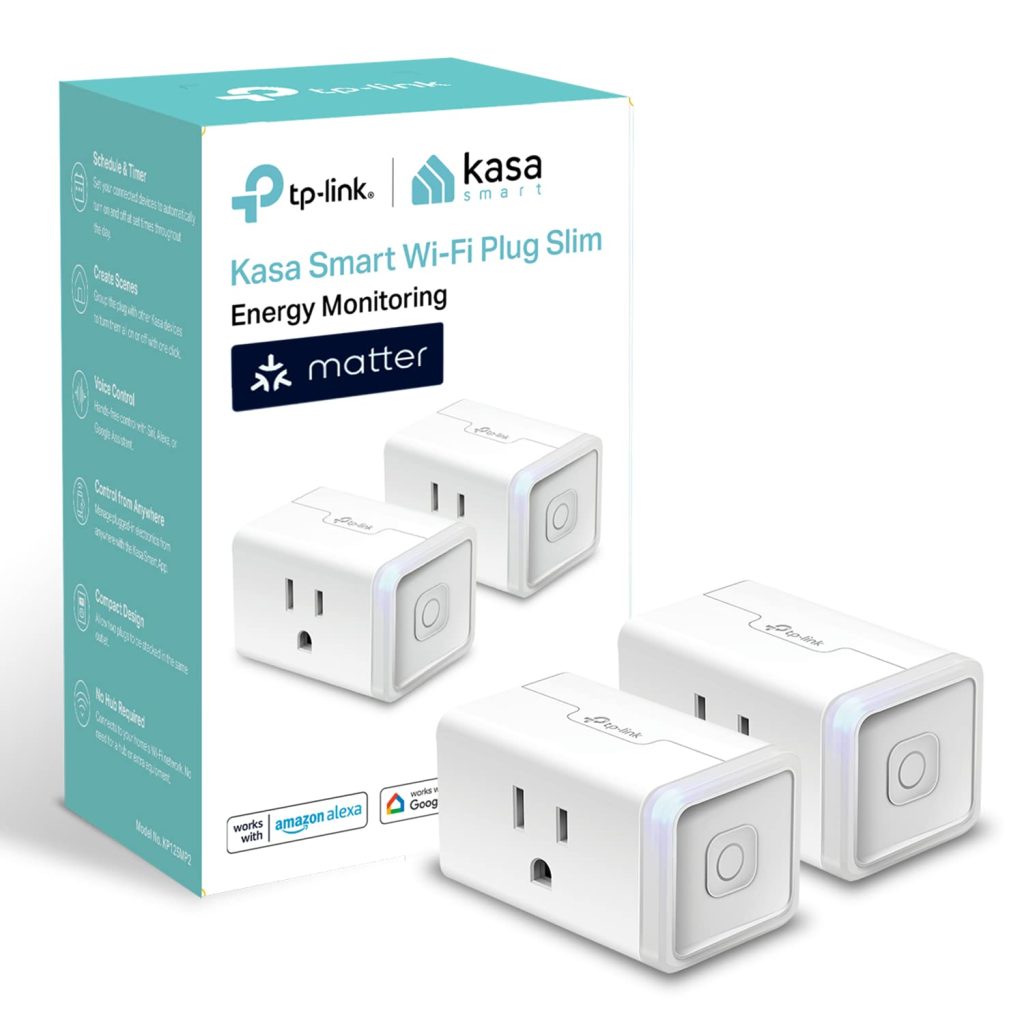
The Kasa KP125M is the version of this plug that TP-Link should have built from the start.
Matter certification means a single QR code scan during setup adds it to Amazon Alexa, Google Home, Apple HomeKit, and Samsung SmartThings simultaneously, with no separate linking steps required.
Combined with real energy monitoring,
it covers every use case the previous generation covered and removes every compatibility question at the same time.
KP125M specs
- Connectivity: 2.4GHz Wi-Fi (802.11b/g/n) + Matter over Wi-Fi
- Max load: 15A / 1800W at 120V
- Energy monitoring: Real-time watts, historical usage, monthly cost estimate
- Smart home compatibility: Alexa, Google Home, Apple HomeKit, SmartThings (all via Matter)
- Design: Compact slim profile, single outlet, does not block adjacent socket
- Price: ~$25 to $30 for a 2-pack (~$12 to $15 per plug)
What the KP125M does well
The compact design is the first thing worth mentioning.
Most smart plugs block the adjacent outlet on a standard US duplex socket. The KP125M does not.
The slim rectangular body leaves the second outlet fully accessible, which matters when you are trying to add smart control to a power strip or a socket behind furniture.
Furthermore, the energy monitoring in the Kasa app is genuinely useful, not just a checkbox feature.
The app tracks real-time wattage, daily and weekly usage history, and produces a monthly cost estimate based on your electricity rate.
I used a KP125M on a 3D printer for six months, and the app’s usage figures tracked within 4 percent of my electricity bill for that circuit.
For identifying standby power wasters: televisions, game consoles, desktop computers in sleep mode: the accuracy is sufficient to make real decisions.
Setup through the Kasa app takes about three minutes on a first-generation install.
Notably, Matter models can also be set up directly from Apple Home, Alexa, or Google Home without the Kasa app at all, which matters for households that do not want to add another app to their phone.
Expert Tip
The KP125M connects on 2.4GHz only. If your mesh router uses a single SSID for both 2.4GHz and 5GHz bands, your phone may hand you off to 5GHz during setup while the plug waits on 2.4GHz.
This breaks the pairing process without an error message that explains why.
The fix: temporarily connect your phone to a 2.4GHz-only guest network, or split your mesh bands into separate SSIDs (named something like “YourHome_2.4” and “YourHome_5”) during setup.
Merge them back after the plug is paired.
What the KP125M does not do well
Two things are worth knowing before you buy. First, the KP125M relies on TP-Link’s cloud for remote access.
When TP-Link’s servers have an outage: which happens a few times per year: remote access and automations that route through the cloud stop working until service resumes.
Local control on the same network continues. If full local processing and privacy are priorities, the Eve Energy (Thread) is the correct alternative.
Second, the 15A rating means the KP125M is suitable for most household loads but should not run high-current appliances like space heaters, window air conditioners, or electric kettles near their rated capacity continuously.
Check your appliance’s amperage before plugging in.
Kasa EP10 Review: The Budget Pick When Energy Monitoring Is Not Needed
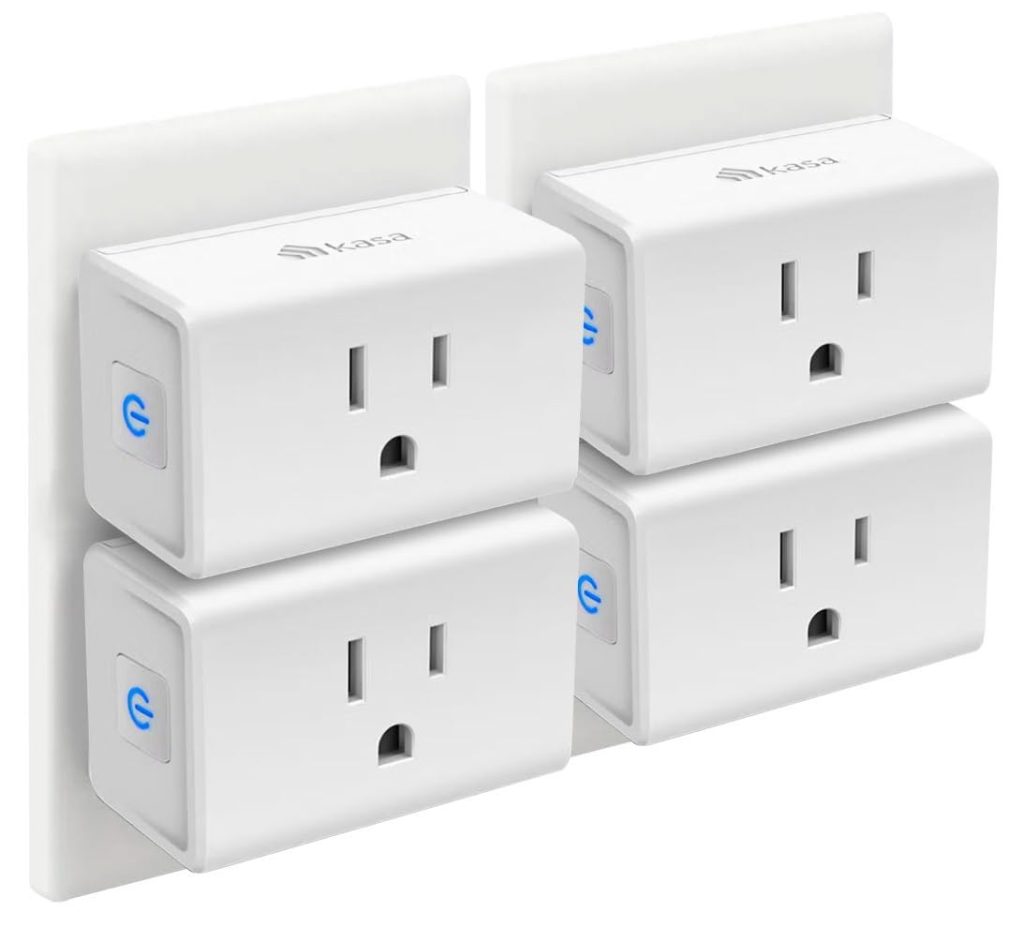
The Kasa EP10 exists for one reason: lowest possible per-plug cost for basic on/off automation.
At $7 to $9 per plug, it is roughly half the price of the KP125M. The trade-off is equally clear: no Matter, no energy monitoring, no HomeKit support.
For a lamp, a fan, or a string of outdoor Christmas lights on a schedule, the EP10 does the job without overpaying.
It works with Alexa and Google Home via the Kasa app.
Setup is identical to any other Kasa model: download the app, press the button, follow the prompts.
However, the EP10 is not the right choice if you use Apple HomeKit, if you want to track electricity usage, or if you might switch smart home ecosystems in the next two years.
The small price difference between the EP10 and the KP125M disappears quickly against the cost of replacing incompatible hardware later.
Skip the HS103 entirely. It is an older model at a similar price with no meaningful advantage over the EP10.
If you find the HS103 on a deep discount, it functions the same way, but the EP10 is the current replacement.
Kasa EP40M Review: The Best Kasa Outdoor Smart Plug
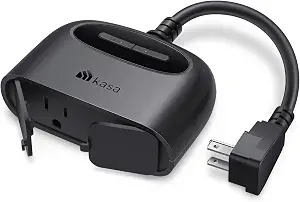
The Kasa EP40M is the current outdoor Kasa plug and the version worth buying in 2026.
Its predecessor, the EP40A, lacked Matter support.
The EP40M adds Matter certification while keeping the dual-outlet design, IP64 weatherproofing, and individual outlet control that made the original useful.
EP40M specs
- Outlets: 2 outdoor-rated, individually controllable
- Weather rating: IP64 (dust-tight, splash-resistant)
- Matter: Yes: works with Alexa, Google Home, HomeKit, SmartThings
- Energy monitoring: Yes, per outlet
- Max load: 15A total / 1800W
- Price: ~$25
The individual outlet control matters more than it sounds.
Running Christmas lights on one outlet and an outdoor camera power supply on the other means you can put the lights on a holiday schedule without affecting the camera.
Additionally, the IP64 rating survives rain and garden hose splash but is not designed for submersion or direct pressure washing.
For most outdoor use cases: string lights, pond pumps, patio heaters, outdoor speakers, the EP40M at $25 is the correct pick.
Kasa’s outdoor single-outlet option costs nearly as much, so the dual-outlet version is almost always better value unless space on the outlet is constrained.
Kasa Smart Plug Energy Monitoring: How Accurate Is It?
Two Kasa models offer Kasa smart plug energy monitoring: the KP125M and the EP40M (outdoors). The KP115 also tracks energy but lacks Matter support.
The Kasa app’s energy monitoring shows real-time power draw in watts, daily and monthly usage in kilowatt-hours, and an estimated monthly cost.
Specifically, the app lets you enter your electricity rate (dollars per kWh), and it calculates running costs automatically.
For most households, this identifies the two or three biggest standby power wasters within the first week of use.
Accuracy-wise, the KP125M performs within approximately 3 to 5 percent of a calibrated power meter across most loads.
For comparative purposes (is this device using more or less power than last month?), that accuracy is reliable.
For billing-level precision, a dedicated energy monitor like the Emporia Vue is a better tool.
For the vast majority of smart home energy tracking use cases, the Kasa’s readings are sufficient.
What standby power actually costs
A 50-inch television in standby mode typically draws 0.5 to 1.5 watts continuously. A games console in rest mode draws 5 to 15 watts. A desktop computer in sleep mode draws 2 to 6 watts. Run a KP125M on each for one week and the Kasa app will show your exact numbers. Most households recover the plug’s purchase price in saved standby power within 2 to 3 months.
Kasa Smart Plug Setup: Alexa, Google Home, and HomeKit
Setup varies slightly depending on your ecosystem.
The full step-by-step guide for every path, including Matter setup, Alexa linking, Google Home linking, and troubleshooting, is in our complete Kasa smart plug setup guide.
The short version for each path is here.
Kasa smart plug Alexa setup
For any Kasa plug, the fastest path to Alexa is through Matter if you have a KP125M or EP40M.
Open the Alexa app, tap Devices, tap the plus icon, select Matter, and scan the QR code on the plug.
No Kasa skill to enable; no cloud account linking required. The plug appears in Alexa within 90 seconds.
For non-Matter models (EP10, KP115, EP25), enable the Kasa skill in the Alexa app first, log in with your TP-Link account, and your devices sync automatically.
Voice control works either way identically.
Kasa smart plug Google Home setup
The Matter path works the same way in Google Home as it does in Alexa.
Open the Google Home app, tap the plus icon, select Matter, and scan the QR code.
For non-Matter models, add the Works with Google Home integration through the Google Home app and link your TP-Link account.
Kasa smart plug HomeKit setup
HomeKit support is the most important reason to choose the KP125M over older models.
Open the Home app, tap the plus icon, select Add Accessory, and scan the QR code on the KP125M.
It joins HomeKit directly via Matter without any bridge or additional hub.
Older Kasa models without Matter do not work with HomeKit at all.
The EP25 is the exception: it has native HomeKit support through a non-Matter implementation that works with older iOS versions, but the KP125M’s Matter path is simpler and more reliable for current devices.
Tapo vs Kasa Smart Plugs: What Is the Difference?
Both Tapo and Kasa are TP-Link brands. The confusion is understandable.
The practical difference in 2026 is small but worth knowing before you buy.
Kasa is TP-Link’s original smart home brand for the US and UK markets, with a more mature app and a longer history of HomeKit support.
Tapo is TP-Link’s newer, globally positioned brand with generally lower prices. Both use the same underlying TP-Link cloud infrastructure.
The Tapo P125M at $8 to $10 is a direct competitor to the Kasa KP125M with Matter and a slightly lower per-plug cost, but no energy monitoring.
If energy monitoring is not important to you and you want the cheapest Matter plug available, the Tapo P125M is a reasonable alternative.
If you already use the Kasa app or want energy tracking, stay with the KP125M.
Consequently, the choice between Tapo and Kasa mostly comes down to whether you want the Kasa app’s energy monitoring features.
Both brands work with the same ecosystems. Both have comparable reliability.
The app experiences are slightly different, but neither is difficult to use.
Kasa Smart Plug Not Connecting: The Four Most Common Fixes
The majority of Kasa smart plug not connecting issues fall into four categories. The full troubleshooting guide is in our Kasa setup and reset guide, but these four fixes resolve most problems:
1. Phone connected to 5GHz during setup
The Kasa plug connects on 2.4GHz only. If your router runs a single SSID for both bands, your phone may be on 5GHz while the plug waits on 2.4GHz.
Fix: temporarily connect your phone to 2.4GHz before starting setup, or use the Matter setup path if your plug supports it.
2. Wi-Fi password contains special characters
Kasa plugs occasionally fail to connect when the Wi-Fi password contains certain special characters.
TP-Link recommends passwords under 64 characters with no quotation marks.
If you have recently changed your Wi-Fi password or it contains symbols, try a simpler test password temporarily.
3. Plug not in setup mode
Hold the button on the plug for 5 seconds until the LED blinks amber and green alternately.
This confirms the plug is in pairing mode.
If the LED is solid or not blinking, the plug is either already connected to a network or needs a factory reset.
4. Router signal too weak at the plug location
Smart plugs connect directly to your router or mesh node.
If the plug is far from the nearest access point, the Wi-Fi signal may be insufficient for a reliable connection.
Move a mesh node closer, or try setup from a socket nearer the router first to confirm the plug works before installing it at its final location.
For a Kasa smart plug reset, hold the button for 10 seconds until the LED flashes amber rapidly.
This wipes all settings and Wi-Fi credentials. The full reset guide with model-specific instructions is in the complete Kasa setup and reset guide.
Frequently Asked Questions: Kasa Smart Plug
Is the Kasa KP125M worth it over the cheaper EP10?
For most buyers, yes. The Kasa KP125M adds Matter support and energy monitoring for roughly $5 more per plug.
Matter means it works with HomeKit, Alexa, Google Home, and SmartThings from one setup, while the EP10 works with Alexa and Google Home only.
Additionally, the energy monitoring in the KP125M typically identifies enough standby power waste to recover the price difference within two to three months.
If you are buying for HomeKit, the KP125M is the only current Kasa model that works.
Why is my Kasa smart plug not connecting to Wi-Fi?
The most common cause of a Kasa smart plug not connecting is the phone being on 5GHz during setup while the plug connects only to 2.4GHz.
If your router uses a single SSID for both bands, temporarily move your phone to 2.4GHz before starting the Kasa app setup.
Other common causes include a Wi-Fi password with special characters, the plug not being in setup mode (hold the button 5 seconds until amber and green blink), and a weak signal at the plug’s location.
The full troubleshooting process is at our Kasa setup and reset guide.
Does the Kasa smart plug work with Apple HomeKit?
The KP125M and EP40M work with Apple HomeKit through Matter.
Older models, including the EP10, KP115, and HS103, do not support HomeKit at all.
The EP25 supports HomeKit natively without Matter on older firmware, though the KP125M is simpler to set up on current iOS versions.
For a HomeKit household, the KP125M is the correct Kasa model to buy.
What is the difference between Kasa and Tapo smart plugs?
Both Kasa and Tapo are TP-Link brands.
Kasa is TP-Link’s US-market smart home line with a longer history of HomeKit support and energy monitoring across more models.
Tapo is the newer, lower-cost global brand.
The Tapo P125M and Kasa KP125M are both Matter-certified plugs at similar prices, with the main difference being that the Kasa includes energy monitoring and the Tapo does not.
For energy tracking, choose Kasa. For the cheapest Matter plug, Tapo is a valid alternative.
How do I reset a Kasa smart plug?
To factory reset most Kasa smart plug models, hold the button for 10 seconds until the LED flashes amber rapidly.
This wipes all Wi-Fi credentials and settings.
For a soft reset that keeps your settings but puts the plug back into pairing mode, hold the button for 5 seconds until the LED blinks amber and green alternately.
The full step-by-step reset guide, including model-specific instructions and app-based reset for the KP125M, is at our complete Kasa setup and reset guide.
Which Kasa Smart Plug Should You Buy? Final Verdict
For the vast majority of buyers, the Kasa KP125M at $12 to $15 per plug is the only model that makes sense to buy new in 2026: Matter plus energy monitoring in one compact plug means it works with every ecosystem from the moment you set it up, and the app’s usage tracking pays for the plug’s small premium over the budget options within a few months of standby power savings.
Buy Kasa KP125M For anyone who genuinely does not need energy monitoring and wants the absolute lowest per-plug cost, the EP10 at $7 to $9 handles on/off scheduling reliably on Alexa or Google Home, but it will not work with HomeKit and cannot be upgraded later.
For outdoor use, the EP40M at $25 adds weatherproofing and dual outlet control with full Matter support: the correct outdoor Kasa plug in 2026.
Buy Kasa EP40M If you are still deciding whether a smart plug is the right tool for what you want to do, our plain English guide to smart plugs covers what they can and cannot do before you spend anything.
