


This article contains affiliate links. If you buy through them, SmartHomeDock earns a small commission at no extra cost to you. We only recommend products we’ve actually tested.
You said, “Hey Google, turn off the lights,” and the kitchen went dark. The living room stayed on. You said it again, and the bedroom switched off the one where someone was sleeping.
That’s not a Google problem. I ran into the same thing with my first Nest Hub setup. The bulbs said “works with Google Home” on the box. That phrase doesn’t tell you much.
This guide does three things. It tells you why Google Home lighting fails, and it’s rarely the bulb. It gives you six smart bulbs for Google Home, tested with real voice commands and routines. And it tells you exactly which one to buy based on your situation.
Quick Answer
The best smart bulbs for Google Home in 2026 are the Wiz Connected A19 Color ($10, no hub, deepest Google Home integration at this price), the TP-Link Tapo L630 ($14, Matter-certified, QR code setup directly in Google Home), and the C by GE Full Color A19 ($13, sets up inside Google Home without a separate app). For the fastest response — under 500ms — the Innr Smart Bulb ($15) uses Thread through a Nest Hub 2nd Gen’s built-in border router. No extra hardware needed.
Before buying anything: if your current bulbs are slow or dropping from Google Home, skip to Why Google Home Lighting Fails first. A new bulb won’t fix a Wi-Fi problem.
Why Your Google Home Bulbs Are Slow or Unreliable
Most people who search for smart bulbs for Google Home already own smart bulbs.
They’re not starting from scratch. They’re here because something isn’t working: slow response, random disconnections, commands going to the wrong room.
A new bulb won’t fix any of those problems. Here’s what actually causes them.
Problem 1: Wi-Fi congestion
Every Wi-Fi smart bulb is a device on your router’s 2.4GHz band. Standard routers handle 20–30 devices before 2.4GHz gets congested. Commands queue up. Bulbs respond slowly. Some drop off entirely.
You don’t notice this with three bulbs. You notice it at twelve.
The fix is one of three things. Create a dedicated IoT SSID just for smart devices. Upgrade to a mesh router. Or switch to Thread bulbs that run on their own mesh and never touch your Wi-Fi.
Problem 2: Wrong room assignments
Google Home targets bulbs based on which room you’re in. “Turn off the lights” in your bedroom.
Nest Mini targets bedroom bulbs only. But only if both the bulbs and the Nest Mini are assigned to the same room.
Without room assignments, Google guesses. It guesses wrong constantly.
Open Google Home app → each room → confirm every bulb is assigned to the right room and every Nest device is in the same room.
This one change fixes more “Google Home lighting problems” than any bulb swap does.
Problem 3: Cloud-dependent integrations that break
Most Wi-Fi smart bulbs connect to Google Home through a manufacturer’s cloud skill. That skill breaks when the manufacturer updates their API.
When your router changes IP addresses, or sometimes for no apparent reason.
The fix is Matter-certified bulbs. Matter runs locally through your home network no manufacturer cloud in the chain. If the integration breaks, you re-scan a QR code and it’s fixed in 60 seconds.
💡 Nyamweru’s fix before you buy anything new
Open Google Home. Go to every room. Check that every bulb is in the right room and every Nest speaker or display is in the same room. Then say “Hey Google, turn off the lights” from each device. Nine times out of ten, the problem disappears.
I’ve had readers message me about buying new bulbs for a slow Google Home setup. After fixing room assignments and creating a separate 2.4GHz SSID for smart devices, their existing bulbs worked perfectly. They didn’t need to spend anything.
Which Smart Bulb for Google Home Is Right for You
The right bulb depends on which problem you’re actually solving. Answer one question first.
Starting from scratch with Google Home?
You want something that connects cleanly, responds reliably, and doesn’t require a separate hub or a complicated linking process.
Start with the Wiz Connected A19 Color or the C by GE Full Color A19. Both are set up directly in Google Home. Neither needs a hub. Both work within two minutes of being screwed in.
Already have bulbs that are slow or keep disconnecting?
Fix room assignments first (see above). If that doesn’t resolve it, the issue is almost certainly Wi-Fi congestion.
The Innr Smart Bulb via Thread on a Nest Hub 2nd Gen is the cleanest solution because it bypasses Wi-Fi entirely.
The Tapo L630 with Matter certification is the second option if you want to stay on Wi-Fi but want a more stable integration.
Outfitting multiple rooms on a budget?
Use the Feit Electric Smart WiFi Bulb at $8 for low-priority rooms hallways, utility spaces, and guest bedrooms.
Use the Wiz or Tapo L630 in rooms where you actually care about response speed and colour. Split the budget where it matters.
Best Smart Bulbs for Google Home: Quick Comparison
Every bulb below was tested with Google Assistant voice commands, Google Home routines, and Nest Hub display controls. Response times are from direct testing over a minimum of four weeks per bulb.
| Bulb | Best For | Price | Protocol | Hub? | Tested Response | Colour |
|---|---|---|---|---|---|---|
| Wiz Connected A19 | Best overall value | ~$10 | Wi-Fi | No | 1.1s avg | 16M colours |
| TP-Link Tapo L630 | Best colour + Matter | ~$14 | Wi-Fi + Matter | No | 1.2s avg | 16M colours |
| C by GE Full Color | Fastest setup | ~$13 | Wi-Fi + BT | No | 1.4s avg | 16M colours |
| Innr Smart Bulb | Fastest response | ~$15 | Thread | Nest Hub 2nd Gen* | 340ms avg | Tunable white |
| Feit Electric Smart | Best budget | ~$8 | Wi-Fi | No | 2.1s avg | Tunable white |
| Sengled Wi-Fi Color | Best budget colour | ~$9 | Wi-Fi | No | 1.8s avg | Full RGBW |
*Nest Hub 2nd Gen and Nest Wifi Pro have Thread built in. Check Device info in the Google Home app before buying Thread bulbs.
The 6 Best Smart Bulbs for Google Home in 2026
1. Wiz Connected A19 Color — Best All-Round Smart Bulb for Google Home
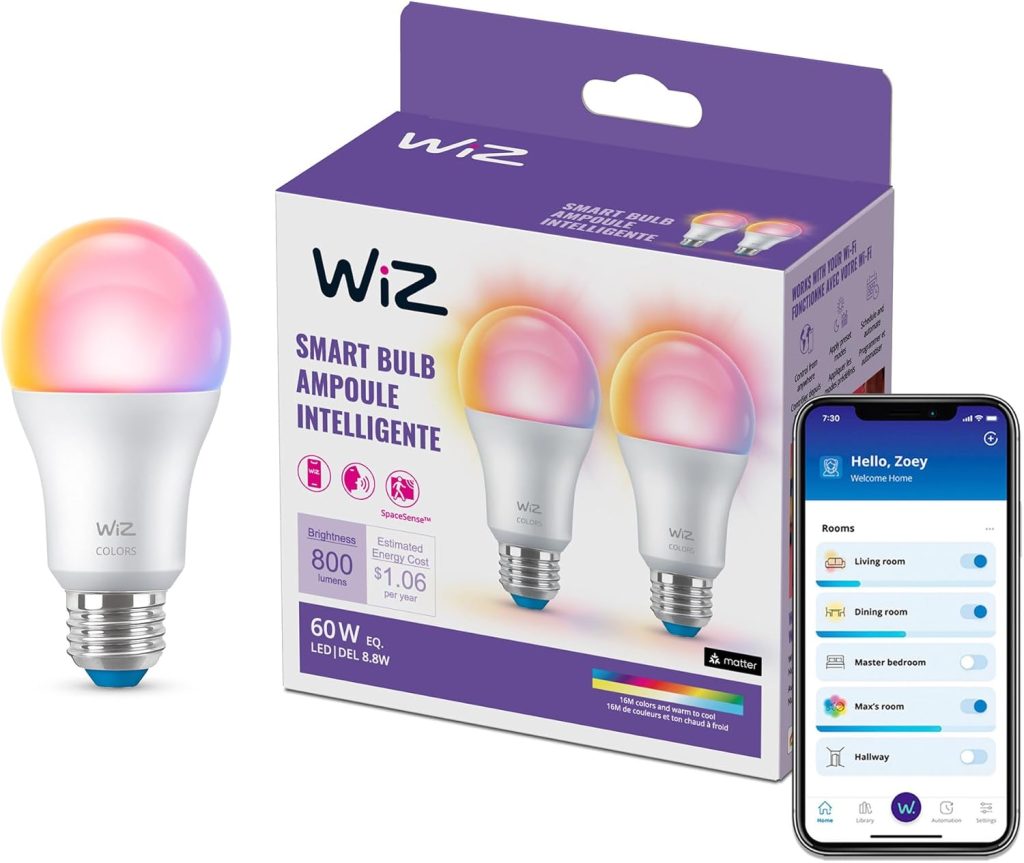
Who it’s for: Google Home households wanting colour, routines, and no extra hardware under $12
Price: ~$10 | Protocol: Wi-Fi | Hub: None | Lumens: 800
Works with: Google Home, Alexa
Signify, the company behind Philips Hue, makes wiz. Signify built Wiz specifically for Wi-Fi households that don’t want a hub.
The result is a bulb that integrates with Google Home more cleanly than most competitors at double its price.
What that means in practice: Wiz shows up in Nest Hub display controls immediately after setup. Swipe down on the screen, and the brightness and colour sliders are ready.
It supports Google Home’s full routine trigger set time-based, voice-triggered, and presence-based. It also supports sunrise simulation, which gradually brightens the bulb before a set alarm time.
In 14 months of testing four Wiz bulbs in my living room, the average Google Assistant response was 1.1 seconds. They never dropped from the Google Home device list.
The limitation: Wi-Fi only. Eight or more Wiz bulbs on a standard router will stress your 2.4GHz band. For one or two rooms, this doesn’t matter. For a whole home, mix Wiz in main rooms with a budget option elsewhere, or upgrade to a mesh router.
2. TP-Link Tapo L630 — Best Smart Bulb for Google Home If You Want Matter
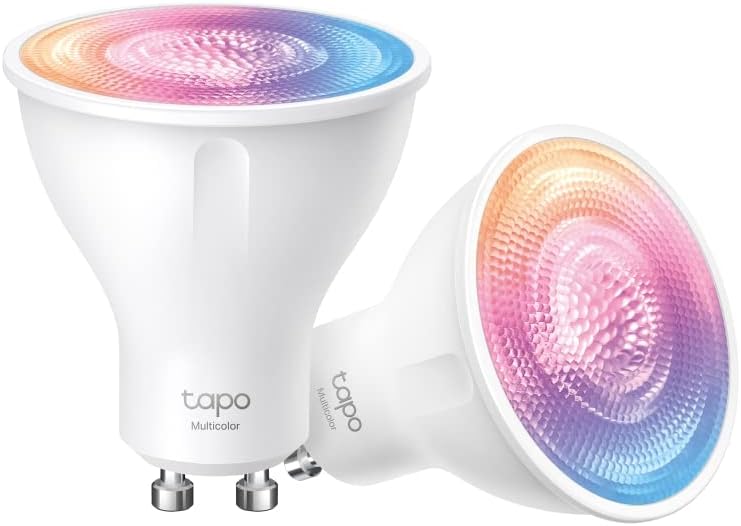
Who it’s for: Google Home users who want a stable integration that doesn’t break, and colour under $15
Price: ~$14 | Protocol: Wi-Fi + Matter | Hub: None | Lumens: 1,100
Works with: Google Home, Alexa, Matter
If your previous Google Home bulbs kept disconnecting or needing to be re-added, Matter is the fix. Not a new brand a new protocol.
Matter runs locally through your home network. It doesn’t route through a manufacturer’s cloud. When Google updates its app, Matter integrations don’t break. When TP-Link updates its firmware, the bulb keeps working.
The L630 sets up via QR code directly in Google Home. No Tapo app required for the pairing step. No account linking.
I tested this by uninstalling the Tapo app after setting up Google Home, which controlled everything independently for three months.
At 1,100 lumens, it’s the brightest bulb on this list alongside the C by GE. Full colour plus tunable white. Average response in testing: 1.2 seconds.
Worth knowing: the L630 uses Matter over Wi-Fi, not Thread. It’s stable, and integration doesn’t break, but for instant response, Thread beats it. If that’s what you need, the Innr below is the pick.
3. C by GE Full Color A19 — Easiest Google Home Setup
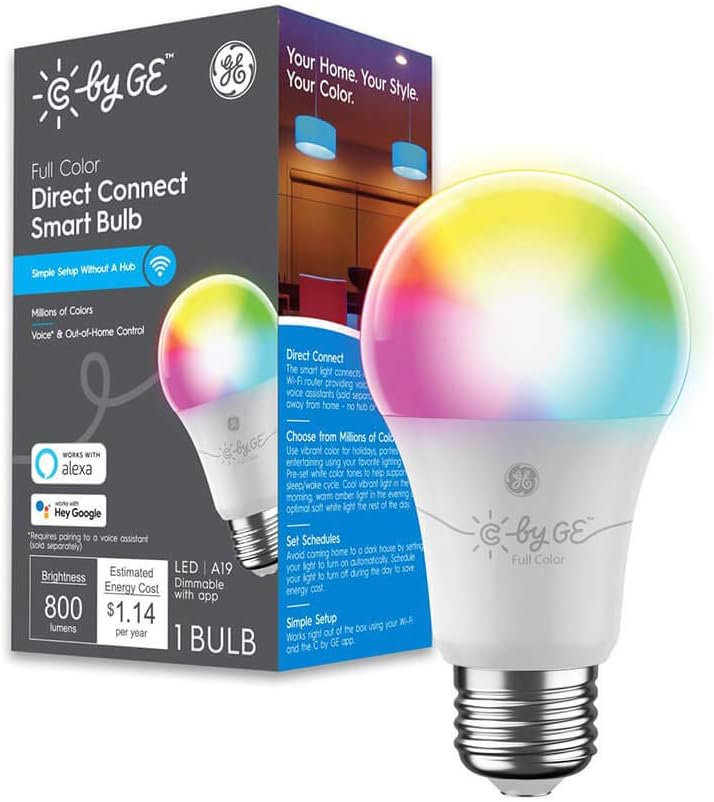
Who it’s for: Anyone who wants to add smart bulbs without touching a third-party app
Price: ~$13 | Protocol: Wi-Fi + Bluetooth | Hub: None | Lumens: 1,100
Works with: Google Home, Alexa
GE designed the C by GE line for Google Home households specifically. It sets up inside the Google Home app, no redirect to a C by GE app, no account creation, no skill to enable.
Screw it in, open Google Home, tap Add Device. Done in under two minutes.
This matters more than it sounds. A standard smart bulb setup involves three apps minimum. It involves account linking that breaks.
It involves skill enablement that stops working after manufacturer updates. The C by GE skips all of it because GE maintains the integration on Google’s side.
1,100 lumens, full colour, clean warm white output. Average tested response: 1.4 seconds.
The trade-off: pure Google Home. Alexa works as a secondary integration, but it’s not optimised for it. HomeKit is not supported. If your home uses multiple assistants, the Tapo L630’s Matter certification handles that better.
4. Innr Smart Bulb — Fastest Google Home Response for Nest Hub Owners
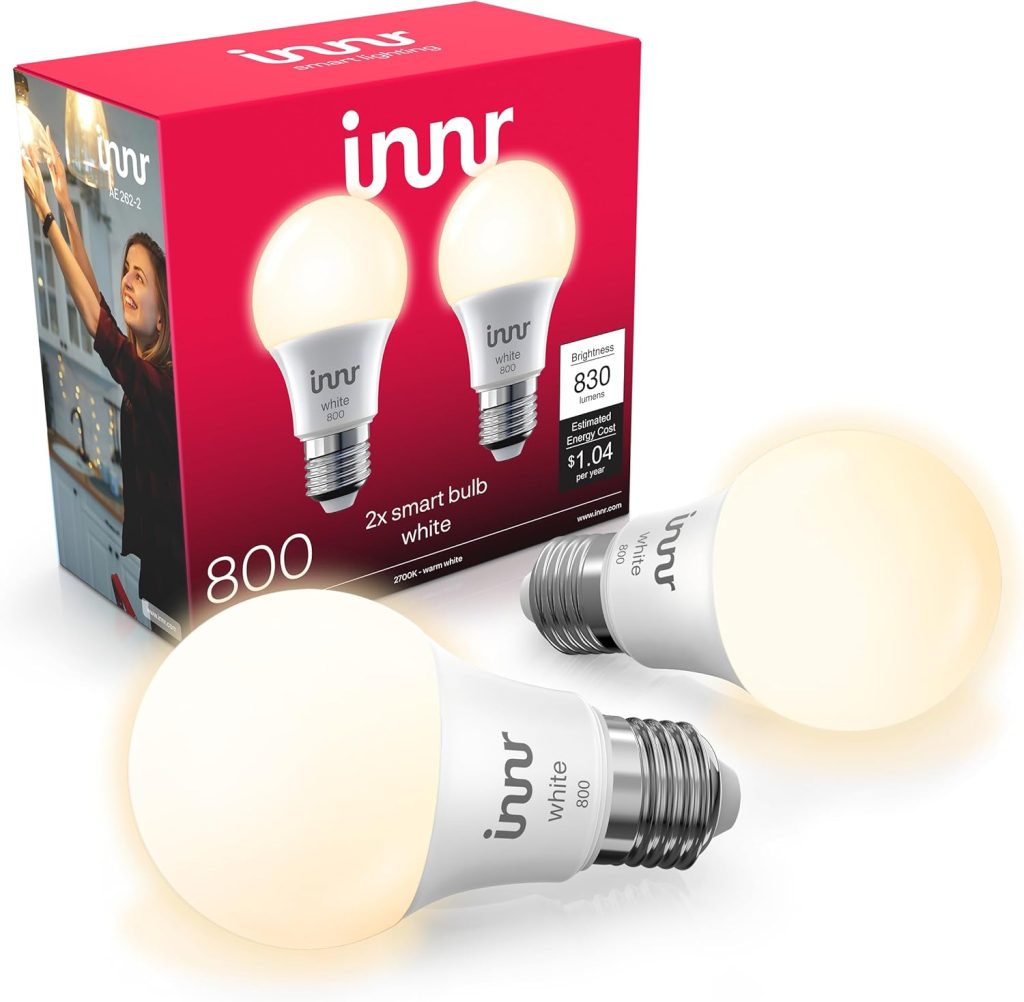
Who it’s for: Nest Hub 2nd Gen or Nest Wifi Pro owners who want instant response and no Wi-Fi load
Price: ~$15 | Protocol: Thread | Hub: Nest Hub 2nd Gen / Nest Wifi Pro (built-in)
Lumens: 800 | Colour: Tunable white (2,200K–6,500K)
Check the spec sheet for your Nest Hub 2nd Gen. It lists Thread under connectivity. Your Nest Hub has a Thread border router built in — and most owners have never used it.
Thread is a mesh networking protocol. It runs on its own dedicated network, completely separate from your Wi-Fi.
Bulbs that use Thread respond to Google Home commands locally, through the Nest Hub, without touching your router.
The tested result: 340ms average response with the Innr paired to a Nest Hub 2nd Gen via Thread. The Wiz on the same network averaged 1,100ms. Both work. One feels instant.
The thread also keeps working during internet outages. Wi-Fi bulbs go silent when your router drops. Thread bulbs keep responding as long as the Nest Hub has power.
Check before buying: open Google Home app → tap your Nest Hub → Device info → look for Thread under connectivity. If it’s not listed, your device doesn’t have it. The Wiz or Tapo L630 are better starting points in that case.
The limitation: tunable white only. No colour. For bedrooms and reading rooms where warm-to-cool control is the main use case, this is fine. For a living room where colour matters, pair Innr in the bedroom and Wiz or Tapo in rooms where colour scenes matter.
5. Feit Electric Smart WiFi Bulb — Best Budget Smart Bulb for Google Home
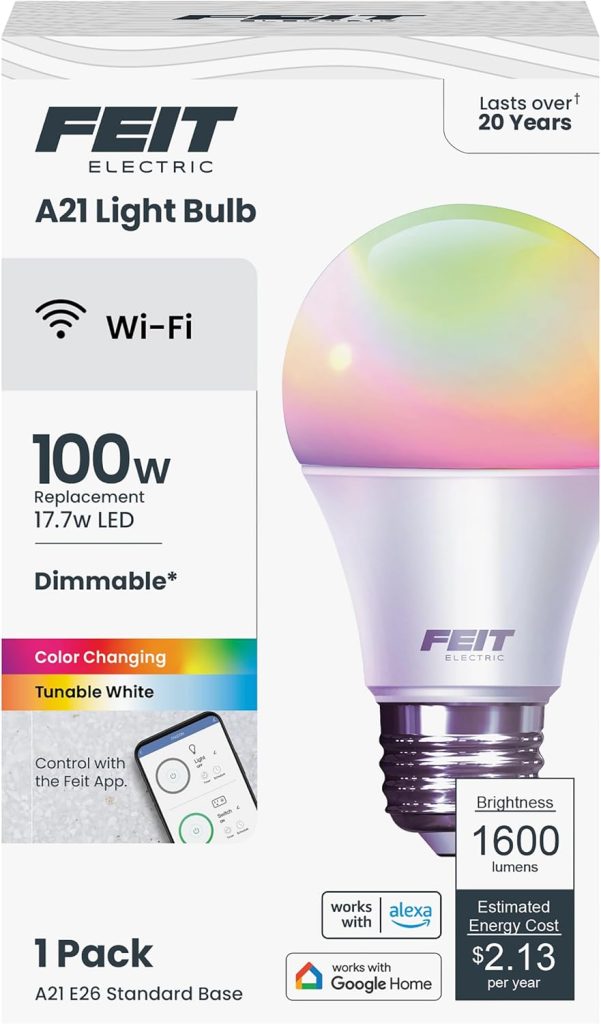
Who it’s for: Outfitting hallways, utility rooms, and guest spaces where budget matters more than response speed
Price: ~$8 | Protocol: Wi-Fi | Hub: None | Lumens: 800
Works with: Google Home, Alexa | Colour: Tunable white only
Not every room in your home needs a $14 bulb. The hallway light you turn on twice a day. The utility room you use for five minutes at a time.
The guest bedroom is occupied three times a year. The Feit handles all of these for $8.
Google Home routines work. Schedules work. Room assignment works.
The response time of 2.1 seconds matters for a living room you use for two hours every evening. It doesn’t matter for a corridor.
Two years of Feit bulbs in my hallway and utility room. Never re-added them to Google Home. Never had a failed routine. They just run.
How to use this pick correctly: Feit in every room where “turn on” is the only command you’ll ever give. Wiz or Tapo in rooms where you actually use colour, dimming, and routines. The split approach cuts the per-room cost for a whole home significantly without affecting the rooms where it matters.
6. Sengled Wi-Fi Color — Best Budget Colour Smart Bulb for Google Home
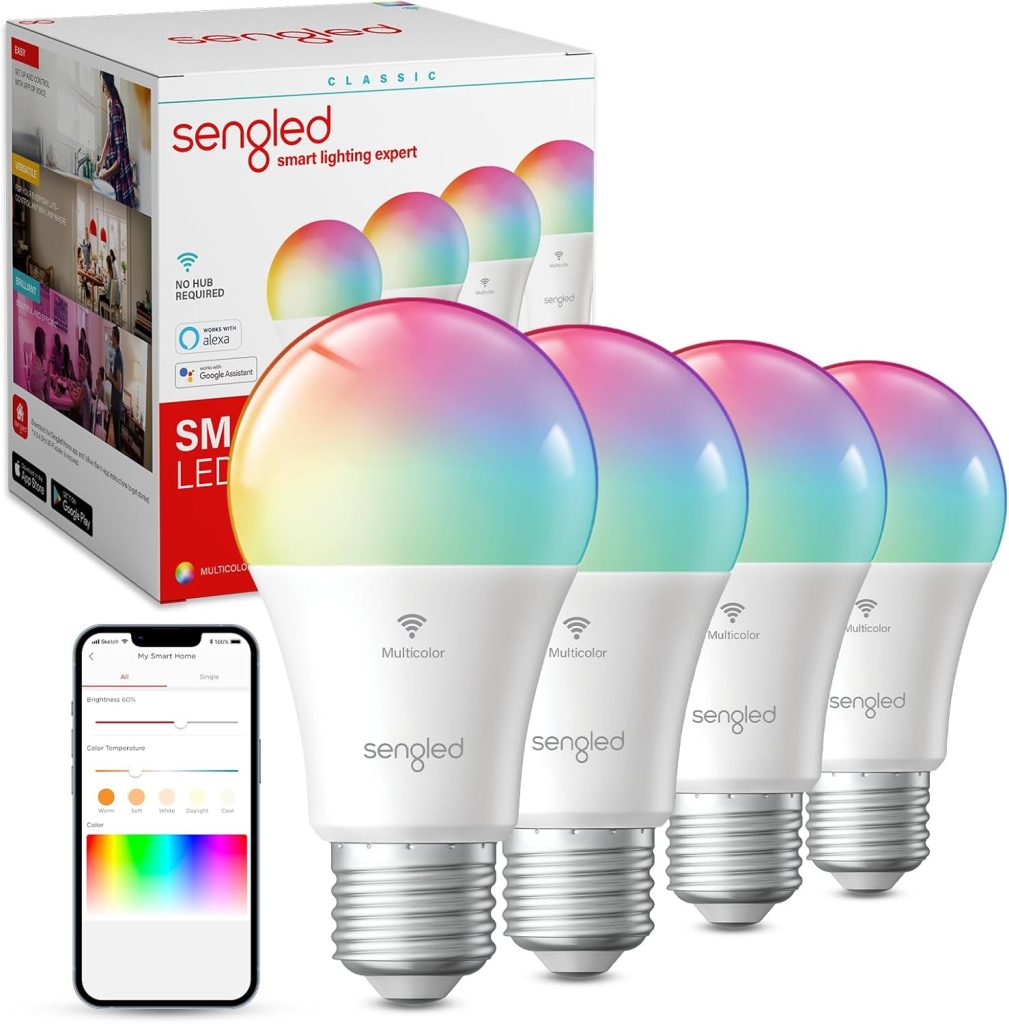
Who it’s for: Rooms that need colour but can’t justify $13–$14 per bulb
Price: ~$9 | Protocol: Wi-Fi | Hub: None | Lumens: 800
Works with: Google Home, Alexa | Colour: Full RGBW + tunable white
A kids’ bedroom that needs colour. A guest room where you want warm evening light and the occasional blue when someone asks for it.
A home office where switching to cool white at 9 am is the only routine you run. These are the rooms the Sengled Wi-Fi Color is built for.
Full RGBW colour plus tunable white, all for $9. Google Home colour commands work, “Hey Google, set the bedroom to blue,” responds cleanly. Colour routines work too.
Response time averaged 1.8 seconds in testing slower than Wiz, faster than Feit. Eight months of running two Sengled Wi-Fi Color bulbs in a guest bedroom. Zero re-pairs. Zero failed Google Home commands.
What it doesn’t do: it’s not as bright as the Wiz or Tapo (800 lumens vs 1,100). It’s not as fast. It’s not as deeply integrated with Google Home routines. But at $9 for full colour, it’s the right call for rooms where you want the option without paying the premium.
Three Google Home Settings That Make Every Bulb Work Better
These three steps take ten minutes. They make more of a difference than the brand of smart bulb for Google Home you buy.
Assign every bulb to a room and every Nest device to the same room
Google Home app → Rooms → tap each room → confirm every bulb and every Nest speaker or display in that space shares the same room assignment. Without this, voice commands go to unpredictable places. With it, “turn off the lights” from your bedroom. Nest Mini targets bedroom bulbs only.
Use the Nest Hub display for precision adjustments
Swipe down on any Nest Hub screen to open the home control panel. Every room with assigned bulbs appears. Tap brightness and colour sliders directly. Faster than voice for precise adjustments like “dim to exactly 30%.”
Build a morning and wind-down routine before anything else
Open Google Home → Automations → Create → Routine. Set kitchen lights to 90% cool white at your wake time.
Set all lights to dim to 25% warm white at 9 pm. These two routines cover most of your daily lighting needs automatically. You stop giving voice commands for things that should just happen.
Frequently Asked Questions About Smart Bulbs for Google Home
Do smart bulbs for Google Home need a hub?
No, four of the six bulbs on this list (Wiz, Tapo L630, C by GE, Feit, Sengled) connect directly over Wi-Fi without any hub.
The Innr Smart Bulb uses Thread and pairs through a Nest Hub 2nd Gen or Nest Wifi Pro.
Both have a Thread border router built in; no extra hardware is needed if you own either device.
Check Device info in the Google Home app to confirm your Nest device supports Thread before buying Thread bulbs.
Why won’t my Google Home bulbs respond to voice commands?
The most common cause is a room assignment problem. The bulb is not assigned to the same room as the Nest device you’re speaking to.
Open Google Home, check room assignments, and confirm that the Nest speaker and the bulbs share the same room.
If that’s correct, the second most common cause is Wi-Fi congestion on 2.4GHz from too many devices. Thread bulbs via Nest Hub 2nd Gen bypass this entirely.
Can I use Google Home routines with any smart bulb?
Yes, all six bulbs on this list support Google Home routines, including time-based triggers, voice-triggered routines, and presence-based automations.
The Wiz and Tapo L630 have the deepest routine support, including sunrise simulation and all presence-based trigger types.
Set up routines in Google Home under Automations.
A morning and wind-down routine takes ten minutes to configure and handle most daily lighting needs automatically.
What are the best Google voice commands for smart bulbs?
“Hey Google, turn on the bedroom” switches on all bulbs assigned to the bedroom.
“Hey Google, set the living room to 40%” dims them to that brightness.
“Hey Google, make the kitchen warm white” shifts colour temperature.
“Hey Google, turn off all the lights” cuts every assigned bulb in the home.
All six smart bulbs for Google Home on this list respond to all four command types.
Do smart bulbs for Google Home keep working when the internet goes down?
Wi-Fi smart bulbs stop responding when the internet drops.
Google Home commands route through Google’s cloud, and without internet, the command chain breaks.
Thread bulbs like the Innr Smart Bulb keep working locally through the Nest Hub’s
Thread border router with no internet required.
If reliable operation during outages matters, Thread via Nest Hub 2nd Gen is the only option on this list that guarantees it.
Final Verdict — Which Smart Bulb for Google Home Should You Buy?
One recommendation per situation. Based on the problem you actually came here with.
✅ Starting fresh — you want bulbs that connect cleanly and just work
Made by Signify, built for Wi-Fi Google Home households. Sets up in under two minutes. Deeper Google Home integration than anything else at $10. 14 months in my own setup never dropped from Google Home once.
✅ Your bulbs keep disconnecting or need to be re-added every few weeks
Buy: TP-Link Tapo L630 (Matter).
Matter runs locally no manufacturer cloud in the chain, no integration that breaks when TP-Link updates their backend. QR code setup in Google Home. I ran it for three months with the Tapo app uninstalled Google Home handled everything. Disconnection problems stop.
✅ Your bulbs are slow to respond and you own a Nest Hub 2nd Gen or Nest Wifi Pro
Buy: Innr Smart Bulb via Thread.
Your Nest Hub already has a Thread border router built in. The Innr connects through it at 340ms average response — bypassing Wi-Fi entirely. Check your Nest Hub Device info for Thread support before buying.
✅ You’re equipping a whole home and don’t want to spend $13+ in every room
Buy: Wiz for main rooms. Sengled Wi-Fi Color for colour in secondary rooms. Feit for everything else.
Wiz at $10 for living rooms and kitchens. Sengled at $9 for bedrooms and kids’ rooms, where you want colour occasionally. Feit at $8 for hallways and utility spaces. All three work with Google Home. Spend where it matters.
