

This article contains affiliate links. SmartHomeDock earns a small commission if you buy through them, at no extra cost to you.
If you run a hub-based smart home (SmartThings, Hubitat, Ring Alarm, or Home Assistant), a Z-Wave door lock is not a luxury add-on.
It is the correct lock protocol, and the difference between it and a Wi-Fi lock matters the moment your broadband goes down.
Wi-Fi smart locks lose app control and voice response when your internet drops.
A Z-Wave door lock keeps working: it stays paired to your local hub, accepts keypad codes, triggers security automations, and responds to your system, all without touching the internet.
For anyone who has invested in a hub-based smart home, that local resilience is the decisive reason to choose Z-Wave over Wi-Fi for a front door.
This guide covers what Z-Wave is and why it matters specifically for locks, which hub you need before buying, the honest differences between the top models, and the specific hub-compatibility matrix that most guides get wrong or omit entirely.
Quick Answer: Best Z-Wave Door Lock 2026
Best overall Z-Wave door lock: Yale Assure Lock 2 Touch Z-Wave (~$216): fingerprint plus keypad, Z-Wave 700, pairs natively with SmartThings, Hubitat, and Ring Alarm, exposes per-code user events to hub automations. The deepest hub integration of any lock tested.
Best for physical security priority: Schlage Connect BE469ZP (~$240): BHMA Grade 1 (the highest certification), built-in tamper and forced-entry alarm, Z-Wave Plus, works with SmartThings, Ring, and Hubitat.
Best budget Z-Wave lock: Kwikset Home Connect 620 (~$120): SmartThings and Hubitat compatible. Note: the keypad-only model does not pair with Ring Alarm. Verify your hub before buying.
Best for new Z-Wave 800 LR radio: Ultraloq Bolt Z-Wave 800LR (~$180): the only mainstream door lock with Z-Wave 800 Long Range, fingerprint, local-first design.
Before buying any Z-Wave lock: you need a Z-Wave compatible hub. A standalone Echo or Google Nest speaker is not sufficient. See the hub section below.
Z-Wave Door Lock vs Wi-Fi Lock: Why Protocol Matters
Most smart lock buyers see “Wi-Fi” and “Z-Wave” as two connection methods and assume they are interchangeable.
For a door lock specifically, they are not.
Why Z-Wave wins for hub-based smart homes
Local operation when the internet drops. Z-Wave runs at 908 MHz in the US: its own radio frequency, separate from your Wi-Fi network.
Your hub communicates with Z-Wave devices directly over this mesh without touching the internet.
When your broadband goes down (or your router reboots at 3 am), your Z-Wave lock continues responding to hub automations, keypad codes, and security system events.
A Wi-Fi lock in the same outage stops responding to your app and cannot trigger automations until your internet returns.
Z-Wave is a mesh network. Unlike Wi-Fi, where every device connects directly to the router, Z-Wave devices relay signals through each other.
Each Z-Wave device in your home acts as a signal repeater, which means the mesh gets stronger and more reliable as you add more devices.
A Z-Wave lock at the front door that is 40 feet from the hub routes its signal through the Z-Wave plug in the hallway.
Notably, battery-powered Z-Wave locks do not repeat signals (only mains-powered Z-Wave devices do), but they benefit from a strong existing mesh.
Interference-resistant. 2.4 GHz Wi-Fi is a crowded spectrum. Every neighbour’s router, every microwave, and every baby monitor competes on the same frequencies.
Z-Wave at 908 MHz has far less competition and significantly fewer interference issues in dense residential environments.
Security certification. Z-Wave 700 and 800 series locks use S2 security with AES-128 encryption for the pairing handshake.
Specifically, S2 Security was added to Z-Wave from the 500 series onward and is standard on every current Z-Wave lock.
This does not mean Z-Wave is inherently more secure than Wi-Fi, but the Z-Wave Alliance’s mandatory certification process means every certified lock has been tested against the standard.
When Wi-Fi locks are the better choice
Z-Wave is not the right answer for every buyer. If you do not own a Z-Wave hub, a Wi-Fi lock like the Schlage Encode Plus or Yale Assure Lock 2 with Wi-Fi module is simpler to set up and costs less overall (no hub required).
Additionally, Wi-Fi locks can receive remote commands from anywhere in the world without hub infrastructure.
Z-Wave locks require the hub to be online and reachable for remote access (even though local operation continues without internet).
For renters, apartment dwellers, or buyers who want a standalone lock without a hub ecosystem, Wi-Fi is the easier starting point.
See our best smart locks guide for Wi-Fi and Bluetooth options alongside Z-Wave.
Z-Wave Door Lock with No Hub: Why You Need One First
This is the most important section for buyers new to Z-Wave: a Z-Wave door lock requires a compatible hub to connect to your smart home ecosystem.
A standalone Amazon Echo, Google Nest speaker, or HomePod Mini is not sufficient.
Z-Wave is a radio protocol, not a Wi-Fi standard. Your router cannot see Z-Wave devices.
Your Echo cannot pair with a Z-Wave lock directly (the Echo 4th gen has a built-in Zigbee radio, not Z-Wave).
To use a Z-Wave door lock with voice control or app automation, you need a hub with a Z-Wave radio that bridges the lock into your ecosystem.
Which hubs support Z-Wave locks in 2026
| Hub | Z-Wave generation | Local control | Works offline? | Best for |
|---|---|---|---|---|
| Ring Alarm Base Station | Z-Wave Plus (700) | ⚠️ Partial | Limited | Alexa households, Ring ecosystem buyers |
| Samsung SmartThings Aeotec Hub | Z-Wave 700 | ⚠️ Cloud dependent | Partially | SmartThings ecosystem, Samsung appliance households |
| Hubitat Elevation C-8 Pro | Z-Wave 800 LR | ✅ Fully local | ✅ Yes | Privacy-first, local control priority, advanced automations |
| Home Assistant (with Z-Wave USB dongle) | 700 or 800 (dongle-dependent) | ✅ Fully local | ✅ Yes | Open-source enthusiasts, maximum automation depth |
Notably, Ring Alarm Base Station requires a Ring Protect Plus subscription (~$20/month) for full remote access features, and lock control requires an active plan.
Hubitat and Home Assistant have no subscription requirement for Z-Wave lock control.
For a full hub comparison, including the Aeotec SmartThings hub, see our smart home hub guide and our Aeotec hub review.
⚠️ The Ring Alarm lock compatibility trap
Not every Z-Wave lock pairs with Ring Alarm, even if it is labelled Z-Wave compatible.
The Kwikset Home Connect 620 keypad-only model specifically does not pair with Ring Alarm despite being a certified Z-Wave device. It works with SmartThings, Hubitat, and Home Assistant without issue.
If your hub is Ring Alarm, verify Works-with-Ring certification on the specific model number before buying. The Yale Assure Lock 2 Touch (ZW3 module) and Schlage Connect BE469ZP are both Ring Alarm certified and pair reliably.
Z-Wave 700 vs 800 Series: What It Means for a Door Lock
Most 2026 Z-Wave locks use either the 700 or 800 series radio.
The difference matters, but not for the reason most articles emphasise.
Range articles focus on Z-Wave Long Range’s 1,300-foot capability versus the 150-foot mesh range of older Z-Wave Plus.
For a door lock, this range difference is irrelevant: your front door is not 1,300 feet from your hub.
What the 800 series actually delivers for door locks is approximately 50% better battery life through more efficient radio architecture.
Specifically, Silicon Labs’ documented battery improvement for the 800 series is the practical reason to prefer an 800 series lock over a 700 series lock when the option exists at a similar price.
Furthermore, 81% of new Z-Wave certifications in Q2 2026 were for Long Range devices, making 800 series hardware the mainstream standard rather than a premium upgrade.
Consequently, as 700 series locks reach the end of their product life, 800 series equivalents will replace them.
The Ultraloq Bolt Z-Wave 800LR is currently the only mainstream door lock with a Z-Wave 800 radio.
The Schlage Connect BE469ZP and Yale Assure Lock 2 both use Z-Wave 700/700 Plus, still excellent and fully capable, but one generation behind.
The practical buying guidance: if the 800 series option is within $30 of the 700 series equivalent, choose 800.
If you are replacing a working Z-Wave 500 or 700 series lock on an established mesh, the upgrade benefit is modest unless battery life is a specific pain point.
The Best Z-Wave Door Locks in 2026: Picks by Hub and Use Case
1. Yale Assure Lock 2 Touch Z-Wave: Best Overall Z-Wave Smart Lock
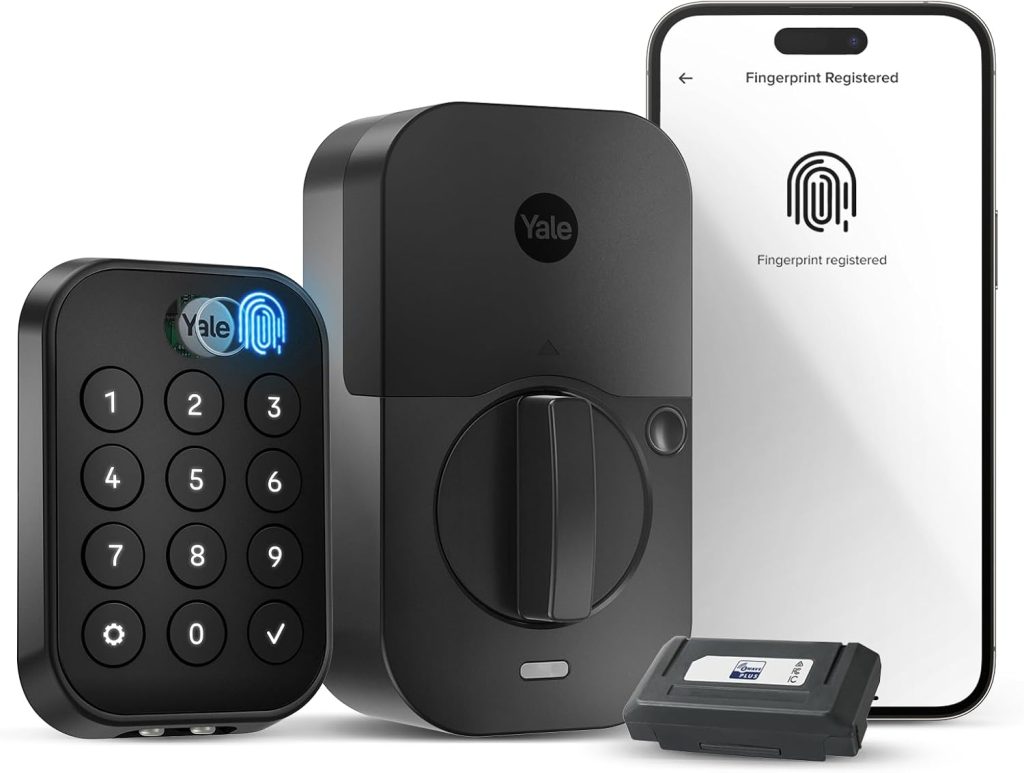
Model: YRD430-F-ZW3 | Price: ~$216 | Z-Wave generation: 700 (ZW3 module)
Entry methods: Fingerprint, keypad, app, auto-unlock | BHMA rating: Grade 1 (select variants)
Hub compatibility: SmartThings ✅ Ring Alarm ✅ Hubitat ✅ Home Assistant ✅
Battery life: 12 to 18 months (4x AA) | Key backup: ❌ (touch-to-power via 9V if battery dies)
The Yale Assure Lock 2 Touch is the best Z-Wave smart lock for hub users in 2026 because of its automation depth, not its hardware features.
The ZW3 module exposes lock and unlock events per access code to the hub, meaning SmartThings, Hubitat, or Home Assistant can trigger different automations based on which user’s code opened the door.
Person A’s code disarms the alarm and turns on the kitchen lights.
Person B’s code turns on the office lights and leaves the alarm active.
Per-code user automation is the most useful smart lock capability in a hub-based home, and the Yale Assure Lock 2 implements it more cleanly than any other Z-Wave lock tested.
Fingerprint authentication is genuinely fast at 0.5 seconds in testing, which is meaningful for daily use at a front door.
The modular design allows upgrading the connectivity module separately, so a Bluetooth-only Yale Assure Lock 2 can gain Z-Wave capability later by swapping the module rather than replacing the entire lock body.
The honest limitation: no physical key backup on most variants. If the battery dies completely and no 9V battery is available for the emergency touch-to-power feature, you cannot enter through the keypad.
Additionally, the Grade 2 physical security rating on standard variants is lower than the Schlage Connect’s Grade 1. For buyers who prioritise physical break-in resistance over smart features, Schlage is the stronger choice.
2. Schlage Connect BE469ZP: Best Z-Wave Lock for Physical Security
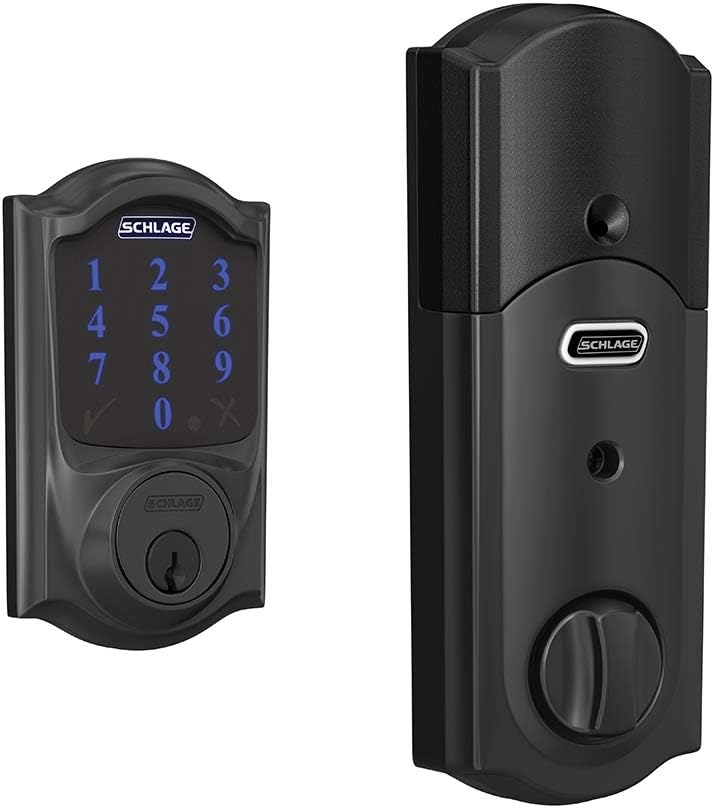
Model: BE469ZP | Price: ~$240 | Z-Wave generation: Z-Wave Plus (700 series)
Entry methods: Keypad (100 user codes), physical key backup | BHMA rating: Grade 1 (ANSI/BHMA A156.30 High Security)
Hub compatibility: SmartThings ✅ Ring Alarm ✅ Hubitat ✅ Home Assistant ✅
Battery life: 12 to 18 months (4x AA) | Built-in alarm: ✅ Detects tampering, forced entry, lock picking
The Schlage Connect BE469ZP earns its position as the physical security leader in this category on two specific credentials: BHMA Grade 1 certification (the highest rating for residential deadbolts, covering security, durability, and finish) and the built-in alarm sensor.
The alarm detects forced entry attempts, lock picking, and physical tampering and triggers independently of the hub.
The lock itself sounds an alert even if your hub or internet is offline. No other Z-Wave lock at this price point includes this feature.
The BE469ZP is one of two Schlage Connect models. The older BE469NX uses Z-Wave (500 series).
The BE469ZP uses Z-Wave Plus (700 series) with S2 security and significantly improved battery efficiency.
When buying, confirm the model number ends in ZP to get the 700 series radio, not NX.
Hub integration across SmartThings, Ring Alarm, and Hubitat is among the most reliable of any Z-Wave lock.
The lock is Works-with-Ring certified and pairs with Ring Alarm Base Station without any additional steps beyond standard Z-Wave inclusion.
Specifically, the built-in tamper alarm surface to hub automations.
SmartThings or Hubitat can trigger an alert or siren when the Schlage reports a tampering event.
The honest limitation: keypad-only entry, no fingerprint option.
For buyers who want biometric entry, the Yale Assure Lock 2 Touch is the correct choice.
Additionally, the Schlage Connect has no Wi-Fi module option.
It is Z-Wave only, meaning remote access requires a hub with internet connectivity rather than a direct Wi-Fi connection.
3. Kwikset Home Connect 620: Best Budget Z-Wave Door Lock
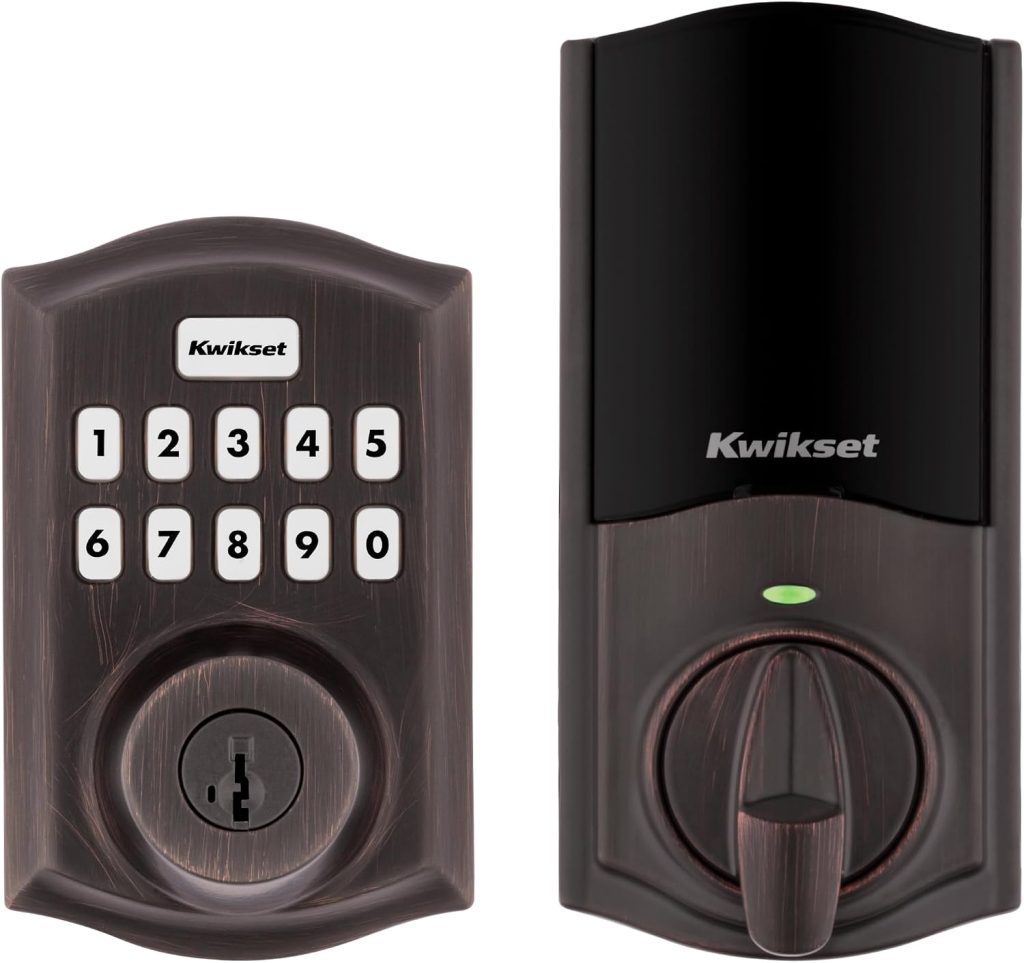
Model: Home Connect 620 | Price: ~$120 | Z-Wave generation: Z-Wave (700 series on current stock)
Entry methods: Keypad (30 user codes), physical key backup | BHMA rating: Grade 2
Hub compatibility: SmartThings ✅ Hubitat ✅ Home Assistant ✅ Ring Alarm ❌ (keypad model)
Battery life: 6 to 10 months (4x AA) | SmartKey re-keying: ✅
The Kwikset Home Connect 620 is the correct recommendation when budget is the primary constraint.
At $120, it provides Z-Wave integration with SmartThings and Hubitat at nearly half the price of the Yale and Schlage options.
SmartKey re-keying is a useful feature: the lock can be re-keyed in seconds with a special tool, without a locksmith, which matters for rental properties or any situation where key control changes frequently.
The critical limitation to state clearly: the keypad-only model of the Kwikset 620 does not pair with Ring Alarm.
This is a documented compatibility gap that many generic Z-Wave lock guides miss.
If your hub is Ring Alarm, the Kwikset 620 keypad model will not join your system.
Verify this before purchasing if Ring is your hub.
Furthermore, battery life at 6 to 10 months is shorter than the Yale and Schlage equivalents, and real-world reports suggest some users replace batteries every 6 to 8 weeks with high-traffic doors.
The Grade 2 physical security rating is also lower than Schlage’s Grade 1.
For a secondary door or a lower-traffic entry point where budget matters most, and Ring Alarm is not the hub, the Kwikset 620 is a solid value.
For a primary front door, the additional $100 for the Schlage BE469ZP buys a meaningful improvement in physical security and battery reliability.
4. Ultraloq Bolt Z-Wave 800LR: Best for Z-Wave 800 and Local-First Setups
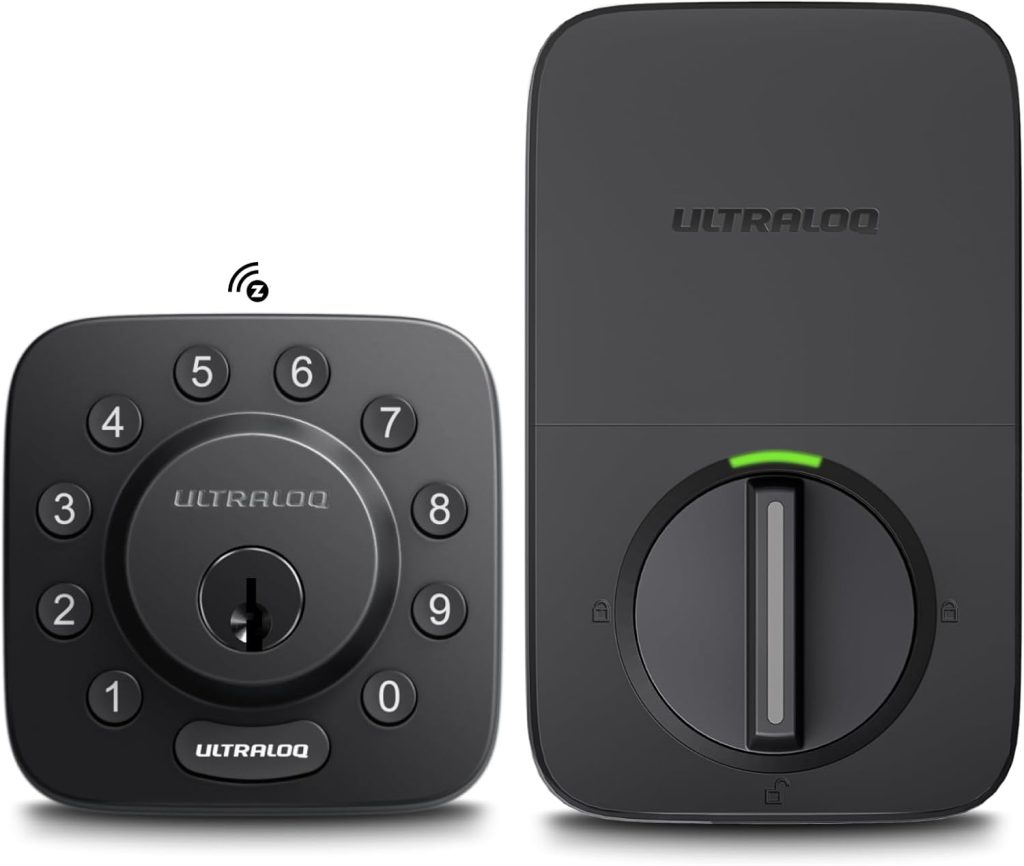
Model: Ultraloq Bolt Z-Wave 800LR | Price: ~$180 | Z-Wave generation: Z-Wave 800 Long Range
Entry methods: Fingerprint, keypad, app | BHMA rating: Grade 2
Hub compatibility: Hubitat ✅ Home Assistant ✅ SmartThings (verify current) Ring Alarm (verify current)
The Ultraloq Bolt Z-Wave 800LR is the only mainstream door lock in 2026 with a Z-Wave 800 series radio.
For buyers on Hubitat or Home Assistant who want the most future-proof Z-Wave lock available, this is the correct pick.
The 800 series radio delivers approximately 50% better battery efficiency than 700 series equivalents, which meaningfully extends the time between battery changes on a high-traffic front door.
Fingerprint authentication, keypad entry, and app control cover the full entry method range.
Local processing emphasis means the lock’s core functions do not depend on cloud connectivity during operation.
The honest caveat: as the newest entrant in this category, hub compatibility verification is particularly important.
Confirmed reports of native pairing with Hubitat and Home Assistant are strong.
SmartThings and Ring Alarm compatibility should be verified against current community reports before purchasing, as Z-Wave 800 LR support on older hub firmware is not guaranteed on every platform.
Check the Hubitat community forum or Home Assistant subreddit for current pairing reports before buying for a specific hub.
Z-Wave Lock Hub Compatibility Matrix 2026
| Lock model | SmartThings | Ring Alarm | Hubitat | Home Assistant | Z-Wave gen |
|---|---|---|---|---|---|
| Yale Assure Lock 2 Touch (ZW3) | ✅ | ✅ | ✅ | ✅ | 700 |
| Schlage Connect BE469ZP | ✅ | ✅ | ✅ | ✅ | 700 |
| Kwikset 620 keypad model | ✅ | ❌ | ✅ | ✅ | 700 |
| Ultraloq Bolt Z-Wave 800LR | ⚠️ Verify | ⚠️ Verify | ✅ | ✅ | 800 LR |
| Yale Assure Lock 2 (keypad, YRD226) | ✅ | ✅ | ✅ | ✅ | 700 |
The inclusion mode that trips most first-time Z-Wave lock buyers
Z-Wave locks pair through a process called inclusion mode.
The hub enters discovery mode, the lock enters pairing mode (usually by pressing a button sequence on the lock keypad), and they exchange encrypted keys.
The most common failure: the lock is too far from the hub during initial pairing. Z-Wave mesh routing only works after pairing.
During the initial inclusion, the lock needs to communicate directly with the hub without mesh assistance.
The fix: bring the hub within 5 to 10 feet of the lock during initial pairing, or temporarily move the lock near the hub.
After successful pairing, return the lock to its installed position. The hub and lock will then route via mesh for all subsequent communication.
Every experienced Z-Wave installer does this on first install. First-time buyers who try to pair with the hub across the house hit repeated failures until they know this.
Frequently Asked Questions: Z-Wave Door Locks
Do Z-Wave door locks work without internet?
Yes, this is Z-Wave’s most important advantage over Wi-Fi locks for hub users.
A Z-Wave door lock communicates with your hub over the Z-Wave radio mesh at 908 MHz, which operates independently of your Wi-Fi network and internet connection.
When your broadband goes down, the lock continues accepting keypad codes, responding to hub automations, and triggering security system events.
The only function that requires internet is remote access via phone app from outside your home network.
All local operations (hub automations, scheduled locking, keypad entry) continue without internet.
What hub do I need for a Z-Wave door lock?
A Z-Wave compatible hub is required. Compatible options include the Samsung SmartThings Aeotec Hub, Ring Alarm Base Station, Hubitat Elevation C-8 Pro, and Home Assistant with a Z-Wave USB dongle (Aeotec Z-Stick 7 or Zooz 800 LR USB).
A standard Amazon Echo, Google Nest speaker, or HomePod Mini does not have a Z-Wave radio and cannot pair with a Z-Wave door lock.
The Echo 4th generation has a built-in Zigbee radio, not Z-Wave.
For a full hub comparison, see our smart home hub guide.
Is the Schlage Connect or Yale Assure Lock 2 better for Z-Wave?
For physical security priority, Schlage Connect BE469ZP is better: BHMA Grade 1 (highest residential certification), built-in tamper alarm, and a proven installation track record across SmartThings, Ring, and Hubitat.
For smart home automation depth, Yale Assure Lock 2 Touch is better: fingerprint entry, per-code user event exposure to the hub (different automations per user code), and a modular design that lets you upgrade the connectivity module independently.
Both are Works with Ring certified. The Kwikset 620 keypad model is not compatible with Ring Alarm.
What is the difference between Z-Wave 700 and 800 for a door lock?
For a door lock specifically, the most relevant difference between Z-Wave 700 and 800 series is battery life: the 800 series radio is approximately 50% more battery efficient.
Range improvements (Z-Wave Long Range reaches 1,300 feet versus 150 feet for mesh) are not meaningful for a front door that is typically within 30 to 50 feet of the hub.
The Ultraloq Bolt Z-Wave 800LR is currently the only mainstream door lock with an 800 series radio.
The Schlage Connect BE469ZP and Yale Assure Lock 2 both use Z-Wave 700, which remains fully capable and is the standard across most 2026 hubs.
Can a Z-Wave lock work with Alexa or Google Home without a hub?
No, Alexa and Google Home cannot communicate with Z-Wave devices directly. A Z-Wave hub is required as the bridge.
Once a Z-Wave lock is paired to a compatible hub (SmartThings, Ring, Hubitat, or Home Assistant), the hub exposes the lock to Alexa or Google Home through its integration, and voice commands then work.
For example, SmartThings exposes all connected Z-Wave devices to Alexa automatically through the SmartThings skill.
“Alexa, lock the front door” then works via SmartThings communicating to the hub, which communicates to the lock over Z-Wave.
The voice command works, but the hub is doing the translation in the middle.
Final Verdict: Best Z-Wave Door Lock for Your Hub
For most hub users, the Yale Assure Lock 2 Touch Z-Wave (~$216) is the right answer: fingerprint plus keypad, native pairing with SmartThings, Ring, and Hubitat, and per-code user automation depth that makes a Z-Wave lock genuinely smarter than a Wi-Fi equivalent.
For buyers where physical security is the priority over smart features, the Schlage Connect BE469ZP (~$240) earns its price with BHMA Grade 1 certification and a built-in tamper alarm that works even without a hub or internet.
Budget-constrained SmartThings and Hubitat users get reliable Z-Wave performance from the Kwikset 620 (~$120), noting the Ring Alarm incompatibility, while Hubitat and Home Assistant users who want the newest Z-Wave 800 LR radio should look at the Ultraloq Bolt 800LR (~$180) as the most future-proof option currently available.
Related Guides on SmartHomeDock
- Smart Home Security: The Complete Guide for 2026
- Best Smart Locks of 2026: 8 Tested and Ranked
- What Is a Smart Lock? How They Work, Whether They’re Safe, and What to Look For
- Kwikset Smart Lock Review 2026: Every Model Compared
- Best Schlage Smart Locks in 2026: Encode, Encode Plus, and Connect Compared
- Yale Smart Lock: Review and Setup Guide 2025
- The Ultimate August Smart Lock Installation Guide in 2024
