
This article contains affiliate links. SmartHomeDock earns a small commission if you buy through them, at no extra cost to you. We only recommend products we have tested or verified through independent sources.
You open the Kwikset page on Amazon and immediately face six different smart lock models with overlapping names and confusing feature differences.
The Halo, the Halo Touch, the Halo Select, the Halo Touchscreen, the Aura, the SmartCode 916: they look similar, price similarly, and the listings do not clearly explain why you would choose one over another.
This Kwikset smart lock review fixes that.
I have tested Kwikset locks across three installs, and below I break down every current model, what each one actually does differently, and the one decision that determines which lock belongs on your door in 2026.
Quick Answer: Best Kwikset Smart Lock
Best overall Kwikset smart lock: Kwikset Halo Select (~$259 to $279): Wi-Fi plus Matter-over-Thread, BHMA Grade AAA certified, geofencing, works with Alexa, Google Home, and Apple HomeKit. The most capable lock in the Kwikset lineup.
Best Kwikset lock for fingerprint access: Kwikset Halo Touch (~$169 to $240): stores 50 fingerprint profiles, Wi-Fi built in, no hub required. Best for households where keypad codes are impractical.
Best budget Kwikset lock: Kwikset Aura (~$155 to $169): Bluetooth keypad, simple app, 250 user codes. No remote access, but the cheapest Kwikset smart option that reliably works.
Bottom line: The first question for any Kwikset smart lock purchase is whether you need remote access. If yes, choose a Wi-Fi model. If not, the Aura saves $80 to $100 and handles everything else well.
Kwikset Smart Lock Models 2026: Which One Is Actually Different
Kwikset’s lineup has expanded significantly since the original SmartCode era.
The current models that matter for a new purchase in 2026 are below.
Older models like the SmartCode 888 and PowerBolt2 still appear on Amazon but have been superseded: skip them.
| Model | Connectivity | Matter | HomeKit | Fingerprint | Geofencing | Price |
|---|---|---|---|---|---|---|
| Halo Select | Wi-Fi + Matter | Yes | Yes | No | Yes (Wi-Fi mode) | ~$259 to $279 |
| Halo Touchscreen | Wi-Fi | No | No | No | Yes | ~$175 to $199 |
| Halo Touch | Wi-Fi | No | No | Yes (50 users) | Yes | ~$169 to $240 |
| Aura | Bluetooth | No | No | No | No | ~$155 to $169 |
| Home Connect 620 | Zigbee / Z-Wave | No | Via hub | No | No | ~$155 |
| SmartCode 916 | Zigbee / Z-Wave | No | Via hub | No | No | ~$175 to $219 |
One note before going further: the SmartKey rekeying system is standard on every Kwikset smart lock listed here.
It lets you rekey the lock to a new key in 30 seconds without removing it from the door: a genuinely useful feature if you move into a previously occupied property or want to standardise all your locks to one key.
The Best Kwikset Smart Lock for 2026
The Kwikset Halo Select is the lock Kwikset should have shipped two years earlier.
It is the only model in the lineup that supports Matter-over-Thread, meaning a single QR code scan during setup pairs it with Amazon Alexa, Google Home, and Apple HomeKit at the same time, without the Kwikset app.
For anyone building or expanding a smart home in 2026, this removes the biggest compatibility decision from the process.
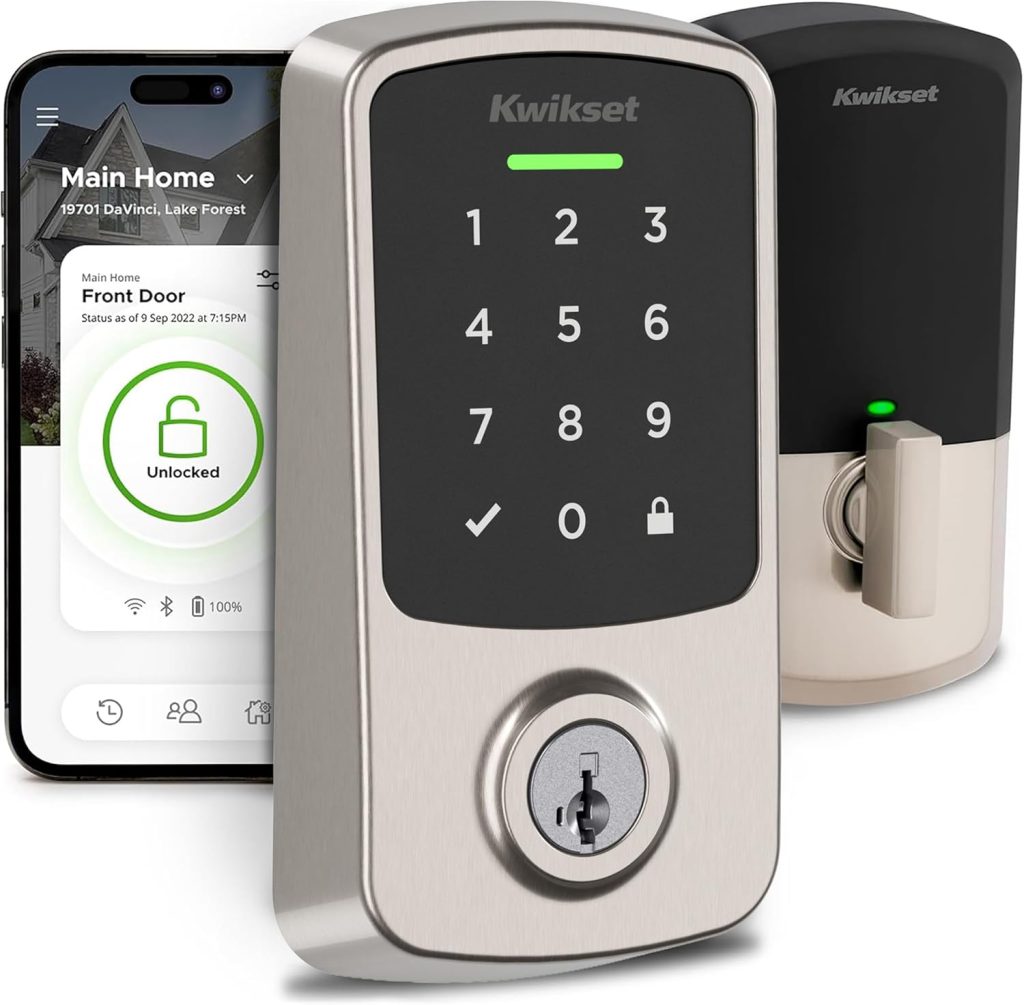
Halo Select specs
- Connectivity: Built-in Wi-Fi and Matter-over-Thread (one active at a time)
- Security: BHMA Grade AAA certified: the highest residential deadbolt grade
- User codes: Up to 250 (fewer on Matter connections)
- Battery: 4 AA (approximately 6 months on Wi-Fi, 12 months on Matter)
- Geofencing: Yes: auto-unlock when you arrive, auto-lock when you leave (Wi-Fi mode only)
- Ecosystems: Alexa, Google Home, Apple HomeKit, Samsung SmartThings
- Door sensor: Magnetic sensor included: confirms whether the door is physically closed
- Price: ~$259 to $279
What the Halo Select does well
The BHMA Grade AAA certification is the most important spec on this lock, and the one most buyers overlook.
Grade AAA requires passing tests for security, durability, and finish that Grade A and Grade B locks do not meet.
In practical terms, it means the deadbolt resists the kind of physical attack: kick-in, drill attack, picking that cheaper locks fail.
Notably, this is the same certification tier as the Schlage Encode Plus, which costs roughly the same. For a front door on a house, Grade AAA matters.
Geofencing on the Halo Select works reliably, activating auto-unlock at approximately 10 to 15 feet from the door based on phone location.
Importantly, the door sensor magnet included in the box means the auto-lock feature knows whether the door is physically open or closed before engaging the bolt.
Many Kwikset locks lack this sensor, creating a risk of the bolt extending while the door is still open and damaging the frame. The Halo Select eliminates that risk.
Expert Tip: Matter vs Wi-Fi on the Halo Select
The Halo Select runs in either Wi-Fi mode or Matter mode, not both simultaneously. Wi-Fi mode gives you geofencing, door sensor alerts, and intrusion detection through the Kwikset app.
Matter mode gives you HomeKit, cross-platform compatibility, and longer battery life but disables those Wi-Fi features. For most households, Wi-Fi mode is the better daily driver unless HomeKit is your primary platform. HomeKit users should choose Matter mode and accept the loss of geofencing.
What the Halo Select does not do well
At $279, the Halo Select is Kwikset’s most expensive lock, and the Matter implementation has a meaningful limitation: switching to Matter mode disables geofencing, door sensor alerts, and the intrusion detection system.
This is a deliberate design decision to prevent conflicting settings between Matter and Wi-Fi, but it means HomeKit users sacrifice real features.
Furthermore, early firmware updates introduced bugs that required a full factory reset to resolve: a known issue that Kwikset has patched but that warrants checking firmware is current before full deployment.
The interior LED indicator, while helpful for status confirmation, is visible through some door frames at night and can be distracting in a dark hallway.
A minor complaint, but worth knowing.
2. Kwikset Halo Touch Review: Best Kwikset Lock for Fingerprint Access
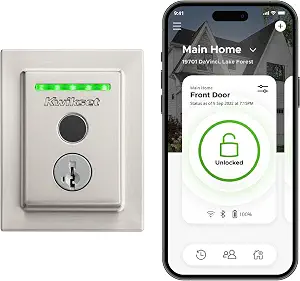
The Kwikset Halo Touch sits at a different point in the lineup: Wi-Fi built in, no hub required, fingerprint access for up to 50 users storing two prints each. It is the right lock for households where a keypad is impractical.
Young children who cannot reliably remember codes, elderly family members who find touchscreen keypads awkward, or anyone who simply wants the fastest possible entry without keys or phones.
Halo Touch specs
- Connectivity: Built-in Wi-Fi
- Fingerprint storage: 50 user profiles (100 total prints: 2 per user)
- User codes: Up to 100 via the app
- Auto-lock: Yes, configurable delay
- Battery: 4 AA (approximately one year with normal use)
- Ecosystems: Alexa, Google Home (no HomeKit, no Matter)
- Price: ~$169 to $240
What the Halo Touch does well
The fingerprint recognition worked reliably across two registered prints in independent testing with no false acceptances and no lockouts during normal use.
For households with mixed users: some who use the app, some who use fingerprint, some who use a keypad code: the Halo Touch accommodates all three access methods simultaneously, which no other Kwikset model does.
Additionally, guest access with time-limited permissions works cleanly through the app.
Send a temporary code or fingerprint invite to a cleaner, a contractor, or a family member visiting for the weekend, and the access expires automatically without any follow-up action needed.
What the Halo Touch does not do well
The most significant limitation is the absence of a door sensor.
Without it, the auto-lock feature operates blind: the lock has no way to confirm the door is physically closed before extending the bolt.
This creates a real risk of the deadbolt engaging while the door is still open and damaging the door frame.
If you use auto-lock on the Halo Touch, treat it as a timed reminder to check the door rather than a reliable automatic system.
Furthermore, the Halo Touch does not support Apple HomeKit or Matter.
For iPhone households using the Home app, this is a firm no.
Consider the Halo Select instead, which adds HomeKit at the cost of fingerprint access.
The app response can also lag by five to seven seconds on remote commands, which is typical for cloud-routed Wi-Fi locks but worth knowing.
Kwikset Aura Review: The Right Budget Pick
The Kwikset Aura is the entry point of the Kwikset smart lock lineup: Bluetooth keypad, up to 250 user codes, Alexa and Google Home support through the app.
At $155 to $169, it costs $80 to $110 less than the Wi-Fi models and handles one specific use case well: a door where you do not need remote access and only need keypad control plus occasional app management from within Bluetooth range.
The critical limitation is worth naming plainly: because the Aura uses Bluetooth only, it has no remote access.
You cannot check the lock status from a different city, receive an alert that the door was left unlocked, or trigger a lock remotely.
When you are home and in Bluetooth range, everything works. When you are away, the lock is on its own.
For rental properties, secondary doors, garage entries, or any door where remote access is genuinely not needed, the Aura is a solid buy.
For a front door on a primary residence where monitoring matters, the additional $80 for the Halo Touchscreen is worth paying for Wi-Fi remote access.
Kwikset SmartCode 916 Review: For Smart Home Hub Users
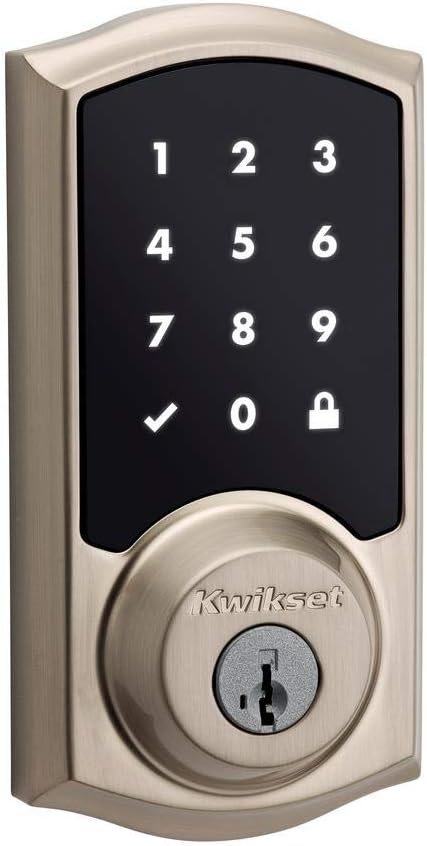
The Kwikset SmartCode 916 connects via Z-Wave or Zigbee, which means it requires a compatible smart home hub to function as a connected lock.
Without a hub: a SmartThings hub, Hubitat, Home Assistant, or a Z-Wave-capable device: it operates as a basic keypad deadbolt only.
Consequently, the SmartCode 916 is not the right lock for most buyers.
It exists for one specific use case: a smart home already running a Z-Wave or Zigbee hub where the user wants deep integration, local processing, and the ability to trigger automations based on lock and unlock events without cloud dependency.
In that context, the SmartCode 916 is excellent: reliable Z-Wave integration, up to 30 user codes managed through the hub interface, and local operation that survives internet outages completely.
If you do not already have a compatible hub and are not building a hub-based system, the Halo Select or Halo Touchscreen are the correct choices.
See our best smart home hub guide if you are considering a hub-based setup.
Kwikset vs Schlage Smart Lock: Which Is Better?
The Kwikset vs Schlage question comes down to two things: security grade and price.
Both brands make Grade AAA-certified locks, but Schlage reaches that tier at a lower price point.
The Schlage Encode Plus at ~$229 matches the Halo Select’s security certification and adds HomeKit via Matter at $30 to $50 less, with a slightly more compact interior profile.
Kwikset’s advantage is the SmartKey rekeying system, which Schlage does not offer.
For renters, new homeowners, or anyone managing multiple entry points who wants to standardise locks to a single key, SmartKey is a genuine practical benefit that Schlage cannot match at any price.
Additionally, the Kwikset Halo Touch’s fingerprint capability has no equivalent in Schlage’s current lineup at a comparable price.
For fingerprint-specific households, Kwikset is currently the better value.
Overall: Schlage has a slight edge on pure security-per-dollar. Kwikset wins on rekeying flexibility and fingerprint access.
Both are reliable choices from established manufacturers with strong warranty support.
How to Install a Kwikset Smart Lock: What to Expect
Most Kwikset smart lock installations replace an existing deadbolt and take 30 to 45 minutes with a Phillips screwdriver. No specialist tools are required.
Before you start
- Check your door thickness: Kwikset smart locks fit standard doors between 1-3/8 inch and 1-3/4 inch thick
- Verify the backset: measure from the edge of the door to the centre of the existing lock hole: should be 2-3/8 inch or 2-3/4 inch
- Download the Kwikset app before starting installation: setup completes through the app after the hardware is fitted
- Have four fresh AA batteries ready
Installation steps
First, remove the existing deadbolt: unscrew both interior mounting screws and pull the interior assembly away from the door.
The exterior escutcheon and latch follow once the interior is free. Second, fit the new Kwikset latch into the edge of the door: the same opening the old latch used.
The latch is directional: the angled face points toward the door frame.
Third, thread the exterior assembly through the door from outside, aligning the tailpiece through the latch.
Fourth, press the interior assembly onto the exterior from inside, aligning the screw holes, and secure with the four provided screws.
Fifth, insert the batteries, confirm the lock cycles the bolt correctly with the thumbturn, and then open the Kwikset app to complete the Wi-Fi or Matter pairing.
Before enabling auto-lock
On Kwikset models without a door sensor (Halo Touch, Aura, Halo Touchscreen), do not enable auto-lock without first confirming the bolt clears the strike plate cleanly when the door is open.
An auto-lock trigger on a door that is not fully closed can extend the bolt into the frame, damaging both the frame and the lock mechanism.
The Halo Select ships with a door sensor magnet that prevents this: use it.
Kwikset Smart Lock Reset: How to Factory Reset Any Model
The factory reset process is the same across the Halo, Halo Touch, and Halo Select.
A factory reset wipes every user code, Wi-Fi connection, and setting, returning the lock to out-of-box condition.
Kwikset Halo / Halo Touch / Halo Select factory reset
- Extend the bolt using the interior thumbturn: this prevents the lock from self-locking during the reset
- Slide the interior cover upward to remove it
- Pull the battery pack straight upward to remove it
- Press and hold the Program button, then reinsert the battery pack while keeping the button held
- Continue holding the Program button for 30 seconds until you hear a beep and the LED turns red
- Press the Program button once more to confirm: the LED flashes green on Halo and Halo Touch, blue on Halo Select
Kwikset Aura factory reset
The Aura uses the same Program button process: remove the back plate, extract the battery, press and hold Program while reinserting the battery, hold for 30 seconds until the LED turns red, then press Program once to confirm.
The LED flashes green on successful reset.
Network reset only (keeps user codes)
To remove only the Wi-Fi or Bluetooth connection without wiping user codes, press the “A” button on the interior for 10 seconds.
This is the correct reset to use when changing Wi-Fi networks or re-pairing after a router replacement, without losing all programmed codes.
System reset (wipes codes, keeps network)
To erase user codes without removing the network connection, press the “A” button 10 times in rapid succession.
Use this when a previous owner has set codes on the lock and you want to clear them before adding your own.
Frequently Asked Questions: Kwikset Smart Lock
Which Kwikset smart lock works with Apple HomeKit?
Only the Kwikset Halo Select supports Apple HomeKit in the current lineup, via Matter-over-Thread.
Older Kwikset models, including the Halo Touch, Halo Touchscreen, Aura, and SmartCode 916, do not work with HomeKit directly.
The Home Connect 620 and SmartCode 916 can reach HomeKit through a Z-Wave or Zigbee hub that supports Matter bridging, such as a SmartThings hub, but this requires additional hardware and setup complexity.
For a simple Kwikset smart lock HomeKit install, the Halo Select is the only correct choice in 2026.
Is the Kwikset Halo better than the Halo Select?
The Kwikset Halo Touchscreen and the Halo Select are both Wi-Fi models, but they target different buyers.
The Halo Touchscreen at $175 to $199 offers Wi-Fi remote access, geofencing, and 250 user codes without Matter or HomeKit support.
The Halo Select at $259 to $279 adds Matter-over-Thread and HomeKit compatibility.
If you use Apple HomeKit or want the cross-platform insurance that Matter provides, the Halo Select is worth the $60 to $80 premium.
If you use only Alexa or Google Home and want remote access at a lower price, the Halo Touchscreen does the job.
Why is my Kwikset smart lock not connecting to the app?
The most common cause of a Kwikset smart lock not connecting is the phone being on 5GHz Wi-Fi during setup, while the lock connects only to 2.4GHz.
If your router uses a single SSID for both bands, connect your phone to 2.4GHz before starting the pairing process.
Other common causes: the lock firmware is outdated (check for updates in the Kwikset app before setup), the Wi-Fi password contains unsupported special characters, or the lock needs a factory reset to clear a previous pairing.
For Matter-connected Halo Select units, remove the lock from any previous ecosystem app before re-pairing.
How long do Kwikset smart lock batteries last?
On the Halo series, expect approximately 6 months on Wi-Fi mode and 12 months on Matter mode under normal use (a front door used 4 to 8 times per day).
The Aura runs slightly longer at approximately one year on four AA batteries.
Battery life drops significantly with frequent remote access, active geofencing, or a lock in a cold climate.
The Kwikset app sends a low battery warning at roughly 20% remaining charge.
Always use quality alkaline batteries: rechargeable NiMH batteries provide lower voltage and can trigger false low-battery alerts.
What is the difference between the Kwikset Halo and Kwikset Halo Touch?
The Kwikset Halo is a touchscreen keypad lock: entry requires typing a code on the keypad.
The Kwikset Halo Touch adds a fingerprint sensor that stores up to 50 user profiles alongside keypad and app access.
Both are Wi-Fi models at similar price points.
The Halo Touch is the correct choice when fingerprint convenience is important; the Halo Touchscreen is correct when you want keypad reliability without the biometric component.
Neither model supports Apple HomeKit: for HomeKit, choose the Halo Select.
Final Verdict: Which Kwikset Smart Lock Should You Buy?
For most buyers who want a reliable Kwikset smart lock with remote access and future ecosystem flexibility, the Halo Select is the correct choice in 2026: BHMA Grade AAA security, Matter for cross-platform HomeKit and Alexa compatibility, a door sensor that makes auto-lock safe, and geofencing that works reliably from 10 to 15 feet out.
Kwikset Halo Select iPhone households or those already using Apple Home should note that Matter mode on the Halo Select disables geofencing: a real trade-off worth planning around.
For households prioritising fingerprint access over HomeKit compatibility, the Halo Touch stores 50 fingerprint profiles alongside keypad and app access with Wi-Fi built in, at $60 to $80 less than the Halo Select.
Kwikset Halo Touch For a secondary door, a garage entry, or any situation where remote access is genuinely not needed, the Aura at $155 handles Bluetooth keypad control with 250 user codes and saves $80 over the cheapest Wi-Fi model.
Kwikset Aura And for smart home builders already running Z-Wave or Zigbee hubs, the SmartCode 916 delivers deep local integration and full hub-based automation that no Wi-Fi model in Kwikset’s lineup can match for reliability during internet outages.
