


This article contains affiliate links. SmartHomeDock earns a small commission if you buy through them, at no extra cost to you.
Thirty-six dollars. That is what the Wyze Cam v4 costs in 2026, and it delivers 2.5K resolution, colour night vision, a built-in spotlight, and local microSD recording. At that price, the obvious question is not “is this any good?”
The real question is “what is the catch?” There are two honest answers to that. First, Wyze’s subscription situation is more important to understand than any hardware spec.
Second, Wyze had a significant security vulnerability disclosure controversy in 2022 that improved but has not fully disappeared from the brand’s reputation. Both of these belong in a Wyze camera review before any product gets recommended.
This review covers the full 2026 Wyze lineup, the real subscription decision, the specific situations where Wyze is genuinely the best choice, and the situations where a different brand is the honest answer.
Quick Answer: Wyze Camera Review 2026
Is Wyze camera good? Yes, for the right buyer. The Wyze Cam v4 ($36) is the best budget security camera in 2026: 2.5K QHD, colour night vision, local microSD recording, and no subscription required to function. It is the strongest sub-$40 camera available.
Best picks: Cam v4 for most indoor and outdoor use. Cam Pan v3 ($50) for full-room or pet monitoring. Cam OG ($24) as the cheapest functional camera available. Battery Cam Pro for wire-free outdoor locations.
Subscription verdict: the free tier with a microSD card is genuinely sufficient for most single-camera setups. Cam Plus at $2.99/month per camera is worth it for multi-camera homes where AI detection and unlimited clip length matter.
Who should look elsewhere: Apple HomeKit users (Wyze has no HomeKit support), privacy-priority buyers (Eufy’s local-only HomeBase architecture is more secure), and buyers who want the deepest Alexa ecosystem integration (Ring).
Wyze Camera Subscription: What You Actually Get Free vs What Costs Extra
The subscription decision is more important than which Wyze camera model you choose. Understanding it before buying prevents the frustration that fills most one-star reviews.
Every Wyze camera ships with a free tier. On the free tier, a motion event triggers a 12-second clip, then the camera enters a 5-minute cooldown window where it records nothing. If someone walks past your door six times in ten minutes, you get one 12-second clip.
Live view works without restriction. If you insert a microSD card (sold separately, up to 256GB), the camera records continuously to local storage regardless of the subscription tier.
No cooldown applies to local recording. You can review any moment in the Wyze app by scrubbing through the local timeline.
Specifically, this means a Wyze camera without any subscription is still a fully functional security setup for most buyers.
Insert a 64GB microSD card (~$8), enable continuous local recording, and you get 24/7 footage with no monthly fee and no cloud dependency.
For a single-camera indoor setup monitoring a front door or garage, this is everything most people actually need.
The local recording workaround nobody mentions upfront
The free tier’s 12-second clip limit and 5-minute cooldown only apply to cloud event clips. Local microSD recording is completely separate and unrestricted.
Continuous recording to a 128GB card gives approximately 14 days of rolling footage on a single camera at 2.5K resolution.
The trade-off: you cannot remotely pull up a specific motion-triggered clip the way you can with cloud events.
To review footage, you scrub through the local timeline in the Wyze app while connected to the same Wi-Fi, or review in person.
For most home setups this is fine. For anyone who needs remote clip access, Cam Plus is the correct answer.
Wyze Cam Plus: is it worth it?
Cam Plus at $2.99 per month per camera removes the 12-second clip cap and the 5-minute cooldown entirely.
Clips extend to 5 minutes maximum. AI detection adds person, pet, package, and vehicle recognition.
Alerts distinguish between a person walking up the driveway and a car passing the street.
For multi-camera homes where you want quick, accurate notifications rather than scrubbing through local footage, Cam Plus is worth the cost.
| Feature | Free tier + microSD | Cam Plus ($2.99/mo per cam) | Cam Plus Unlimited ($9.99/mo) |
|---|---|---|---|
| Live view | ✅ | ✅ | ✅ |
| Local microSD recording | ✅ Unlimited | ✅ Unlimited | ✅ Unlimited |
| Cloud motion clips | 12 seconds, 5-min cooldown | Up to 5 min, no cooldown | Up to 5 min, no cooldown |
| AI person/pet/package detection | ❌ | ✅ | ✅ |
| Cloud storage retention | 14 days | 14 days | 14 days |
| Cameras covered | All cameras | One camera per subscription | Unlimited cameras |
Notably, Cam Plus Lite (the pay-what-you-want plan) was discontinued in late 2023. Any guide still recommending it is outdated. The current free tier and Cam Plus at $2.99 are the correct 2026 options.
For households with three or more cameras, the Cam Plus Unlimited plan at $9.99 per month covers all cameras for the same cost as three individual Cam Plus subscriptions.
Wyze Cam v4 Review: The Best Sub-$40 Camera in 2026
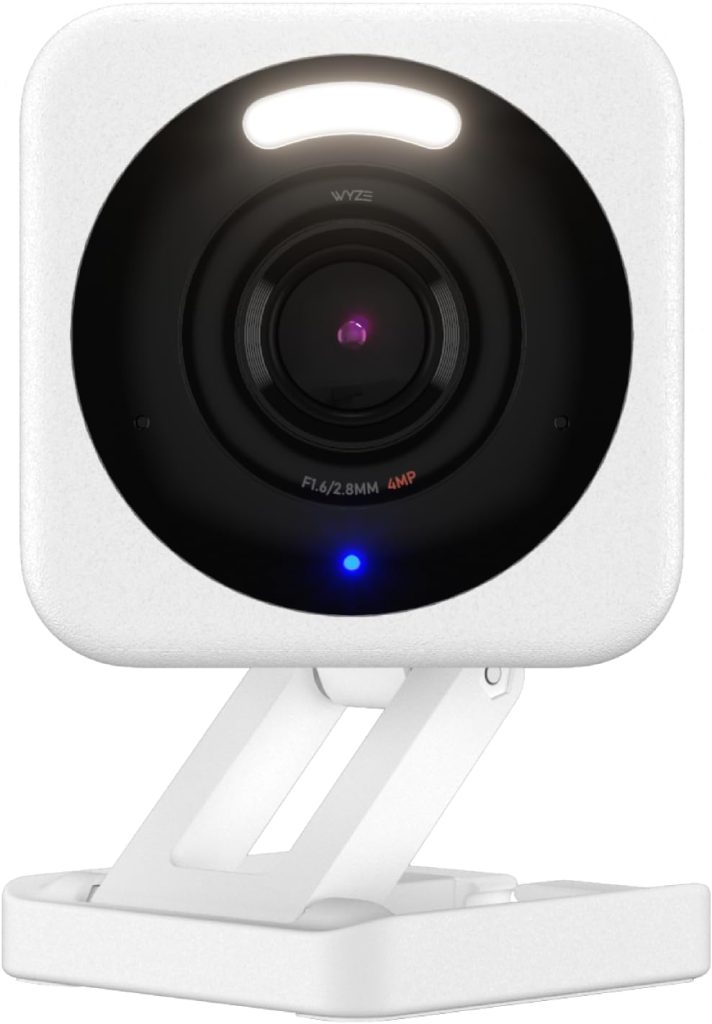
Price: ~$36 | Resolution: 2.5K QHD (2560×1440) | Night vision: Colour (starlight sensor) | Indoor/Outdoor: Both (IP65)
Power: Wired (USB-A, included adapter) | Storage: microSD up to 256GB + cloud | FOV: 130 degrees
Alexa / Google Home: ✅ | Apple HomeKit: ❌ | Spotlight: ✅ Built-in 72 lumen
The Wyze Cam v4 is the product that justifies the brand’s reputation. At $36, it delivers 2.5K resolution that produces genuinely readable footage: faces are identifiable at up to 25 to 30 feet in good light.
And the colour night vision sensor produces usable colour footage in very low ambient light, rather than the grainy infrared black-and-white most cameras in this price range deliver.
The built-in spotlight activates on motion at night, which improves both deterrence and colour accuracy in the recorded footage.
Notably, the IP65 weather resistance rating means it handles rain and dust reliably outdoors, which makes the v4 the correct choice for both front-door monitoring and outdoor use without buying a separate outdoor model.
Consequently, one camera serves both indoor and outdoor deployment, useful for buyers who want flexibility to move cameras seasonally or when they move home.
Specifically, compared to the v3 it replaced: the resolution jump from 1080p to 2.5K is meaningful for licence plate reading and face identification at distance.
The built-in spotlight is new. Wi-Fi 6 support improves streaming reliability in crowded network environments. For v3 owners: the upgrade is worth it if image detail at distance matters. For new buyers, start with the v4.
Wyze Cam Pan v3 Review: The Right Camera for Full-Room Monitoring
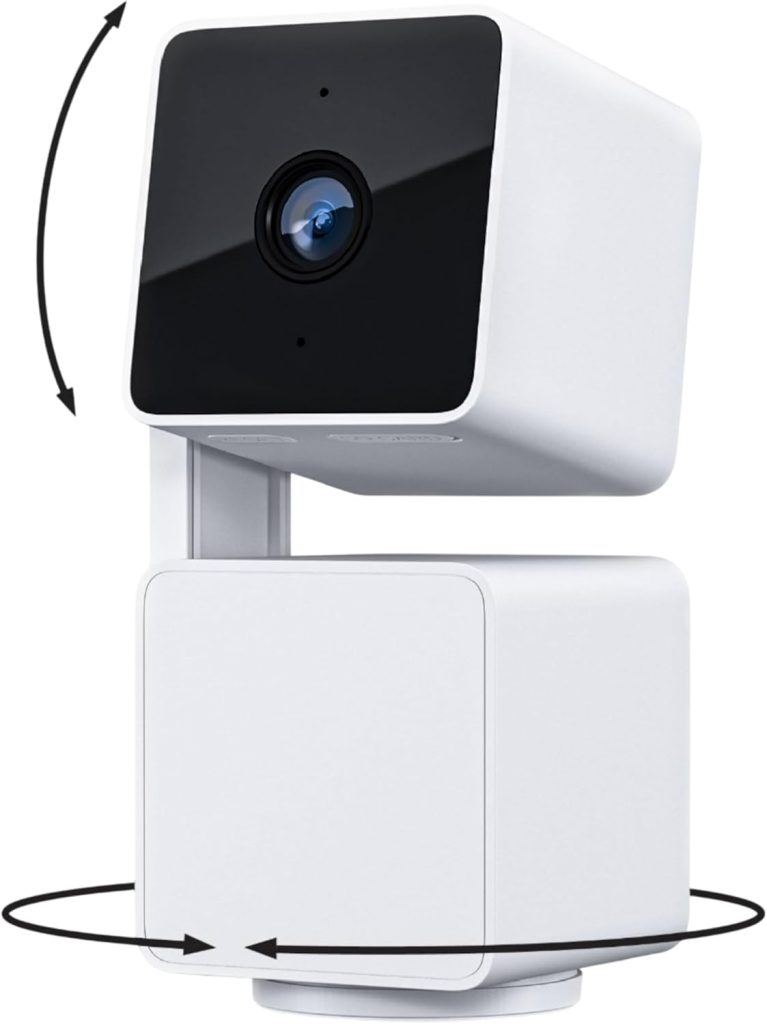
Price: ~$50 | Resolution: 2.5K QHD | Pan/tilt: 360 degree horizontal, 93 degree vertical
Motion tracking: ✅ Auto-tracks moving subjects | Patrol mode: ✅ Rotates between up to 4 waypoints
Power: Wired only | Indoor only: Yes (not weather-rated)
The Cam Pan v3 is the correct Wyze camera for two specific situations: monitoring a large room with a single camera, and tracking an active pet or child across a space.
The 360-degree horizontal rotation covers an entire room from a single mounting point.
Motion tracking locks onto a moving subject and follows it across the full pan range, which means a pet moving from the sofa to the kitchen registers as one continuous clip rather than a brief edge-of-frame appearance.
Furthermore, patrol mode rotates automatically between up to four preset positions, making it useful for monitoring multiple angles of a room on a timed schedule even without detected motion.
For a home office monitoring both the door and the window, patrol mode removes the need for two fixed cameras.
Admittedly, the Cam Pan v3 is indoor-only and wired. It is not weather-rated and cannot be mounted outdoors.
Furthermore, the pan motor creates a very slight noise during rotation that is audible in quiet rooms.
For buyers who want outdoor pan-tilt coverage, the Wyze Cam Floodlight Pro handles outdoor pan/tilt, but at a significantly higher price point.
Wyze Cam OG: The Right Camera When Budget Is the Only Constraint
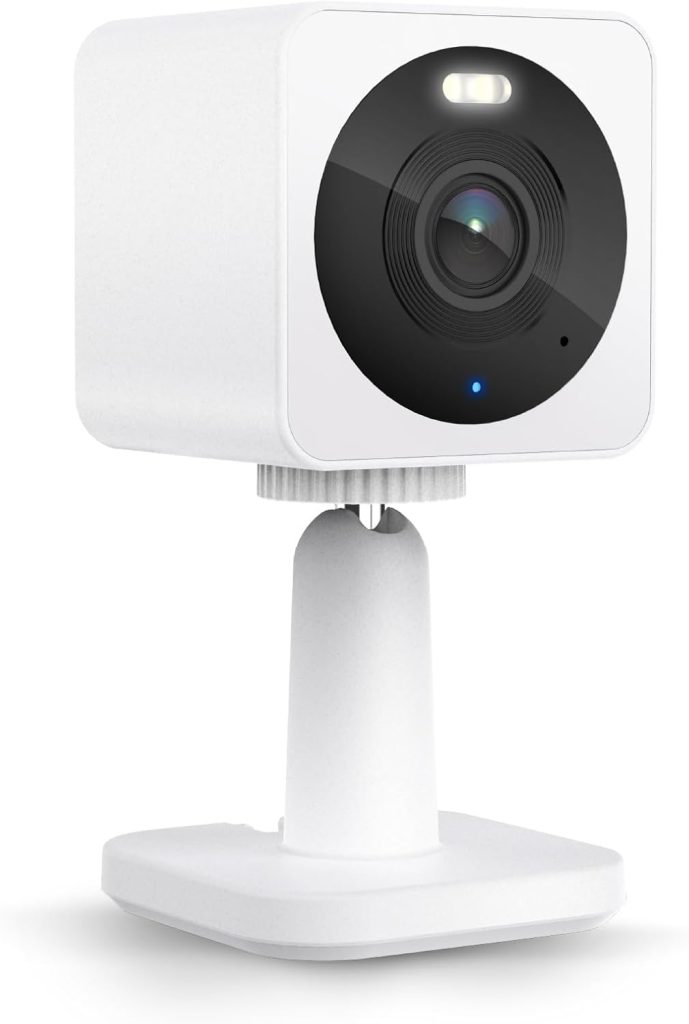
Price: ~$24 | Resolution: 1080p | Night vision: Standard infrared
Indoor/Outdoor: Both (IP65) | Spotlight: ✅ Built-in
Specifically, the Cam OG is Wyze’s entry-level model and the cheapest functional security camera available in 2026.
At $24, it delivers 1080p resolution, built-in spotlight, IP65 weather resistance, and the same microSD local recording as every other Wyze camera.
Specifically, it does not deliver the 2.5K resolution or colour night vision of the v4, but for most indoor monitoring use cases (checking whether a package was delivered, confirming the garage door is closed), 1080p is sufficient at shorter ranges.
The Cam OG also comes in a Telephoto variant (Cam OG Telephoto, ~$30) with a 12x digital zoom optimised for longer-distance fixed viewing like a driveway or street.
The standard and telephoto models can be mounted back-to-back as a Cam OG Duo kit for simultaneous wide and telephoto coverage from a single mounting point.
For most buyers, spending $12 more for the Cam v4 is the better decision unless budget is genuinely constrained to under $25 per camera.
The resolution and night vision difference is meaningful in most real-world scenarios.
Wyze Battery Cam Pro and Floodlight v2: The Outdoor Options
Additionally, beyond the core camera lineup, Wyze offers two outdoor-focused products worth covering for buyers with specific outdoor security needs.
Wyze Battery Cam Pro (~$80): a wire-free outdoor camera running on a rechargeable battery with solar panel compatibility. 2K resolution, colour night vision, and a 150-degree wide-angle lens.
The key trade-off versus the wired Cam v4 for outdoor use: battery life is finite, typically 3 to 6 months depending on motion frequency and temperature, and the camera does not record continuously (motion-triggered only, to preserve battery).
Additionally, the Battery Cam Pro cannot do Cam Plus AI detection without an active Cam Plus subscription.
For locations without a nearby power outlet, it is the correct choice. For locations with power access, the Cam v4 at $36 is a better investment.
Wyze Cam Floodlight v2 (~$120): combines a Cam v4 equivalent camera with two 2600-lumen LED floodlights on a motion-activated mount.
The correct choice for driveways, parking areas, and rear gardens where both illumination and recording are needed.
The floodlights trigger independently from the camera’s recording, allowing motion-activated lighting without cloud event recording if preferred.
Wyze Camera Limitations: What to Know Before Buying
Importantly, an honest Wyze camera review has to cover these limitations directly.
The 2022 security vulnerability: Wyze experienced a significant security incident in 2022 in which a camera vulnerability was internally identified but not disclosed to users for approximately three years.
The vulnerability allowed the possibility of unauthorised camera access under specific conditions.
Wyze’s response was criticised for the delay in disclosure and the scope of the initial public statement.
The company has since updated its vulnerability disclosure policies. This is documented history and belongs in any honest assessment.
For buyers where camera security is a primary concern rather than a secondary consideration (any camera covering a bedroom, a child’s room, or other private areas) Eufy’s HomeBase architecture (local-only encrypted storage, no mandatory cloud) or Google Nest Cam (tightly managed security engineering from Google) are safer choices.
No Apple HomeKit support: Wyze cameras do not integrate with Apple Home or Siri natively.
There is a community-developed HomeKit bridge workaround via Homebridge, but it requires self-hosted software running on a Raspberry Pi or spare Mac.
For iPhone users who want native HomeKit camera integration, eufy (HomeKit Secure Video), Logitech Circle View, or Aqara cameras are the correct alternatives.
Cloud dependency for remote clip access: without a Cam Plus subscription, remote access to specific motion-triggered clips is limited to 12-second cloud events.
Local recording provides full footage but requires scrubbing the local timeline rather than jumping to a specific motion event.
For buyers who travel frequently and want immediate remote access to events (specifically, the ability to pull up exactly what triggered an alert from a different city), Cam Plus is not optional.
5GHz Wi-Fi not supported on most models: most Wyze cameras connect on 2.4GHz Wi-Fi only. In homes with congested 2.4GHz networks, this can cause connection drops.
The Cam v4 supports Wi-Fi 6, which improves reliability significantly in congested environments, but 5GHz connectivity is not available on any current Wyze model.
Wyze vs Ring vs eufy vs Blink: The Honest Comparison
| Factor | Wyze | Ring | eufy | Blink |
|---|---|---|---|---|
| Entry camera price | $24 (Cam OG) | ~$60 (Indoor Cam) | ~$40 (Indoor Cam 2K) | ~$35 (Mini 2) |
| Works without subscription? | ✅ Yes (microSD) | ⚠️ Live view only: no video history free | ✅ Yes (local storage) | ⚠️ Needs Sync Module 2 for local storage |
| Colour night vision | ✅ v4, Pan v3 | ❌ Most models infrared | ✅ Mid-range and up | ✅ Mini 2 only |
| Apple HomeKit | ❌ | ❌ | ✅ HomeKit Secure Video | ❌ |
| Alexa integration | ✅ Good | ✅ Best (native Amazon) | ✅ Good | ✅ Good (Amazon-owned) |
| Battery life (wireless models) | 3 to 6 months | 6 to 12 months | Up to 365 days (EufyCam 3) | Up to 2 years (AA battery) |
| Privacy track record | ⚠️ 2022 disclosure incident | ⚠️ Historic police data sharing | ✅ Local-only HomeBase architecture | ⚠️ Amazon-owned, cloud-dependent |
Consequently, the honest read on this comparison: Wyze wins on price and loses on almost everything else.
That is not a criticism. It is an accurate description of the trade-off. Wyze cameras are the cheapest capable security cameras available.
Ring wins for Alexa ecosystem depth and easiest setup. Eufy wins for local storage privacy and Apple HomeKit. Blink wins for battery life on wireless outdoor models.
Wyze sits at the bottom on price and somewhere in the middle on everything else, which is exactly what budget-conscious buyers need to know.
Frequently Asked Questions: Wyze Camera Review 2026
Is Wyze camera good in 2026?
Yes, for the right buyer. The Wyze Cam v4 is genuinely the best budget security camera available in 2026: 2.5K resolution, colour night vision, IP65 outdoor rating, and local microSD recording at $36.
No subscription is required for basic functionality. The honest limitations are the 2022 security disclosure history, no Apple HomeKit support, and the 12-second clip limit on cloud events without Cam Plus.
For price-priority buyers without Apple devices, Wyze is the clear recommendation.
For privacy-first buyers or iPhone users, eufy is the stronger choice at a higher price.
Do Wyze cameras work without a subscription?
Yes. A Wyze camera without any subscription is still a fully functional security camera.
The free tier provides live view and 12-second cloud motion clips with a 5-minute cooldown between events.
Insert a microSD card (up to 256GB, sold separately) and enable continuous local recording to get 24/7 footage with no clip limits and no monthly fee.
Cam Plus at $2.99 per month per camera adds unlimited clip length, no cooldown, and AI person/pet/package detection.
For a single-camera indoor setup, the free tier with a microSD card is genuinely sufficient for most buyers.
Which Wyze camera is best in 2026?
The Wyze Cam v4 at $36 is the best Wyze camera review recommendation for most buyers: 2.5K resolution, colour night vision, built-in spotlight, IP65 outdoor rating, and works indoors or outdoors.
The Cam Pan v3 ($50) is better specifically for full-room monitoring or pet tracking, with 360-degree pan and automatic motion following.
The Cam OG ($24) is the right choice when budget is the only constraint.
For wire-free outdoor locations without power, the Battery Cam Pro handles the job but costs significantly more and requires recharging.
How does Wyze compare to Ring in 2026?
Wyze and Ring serve different buyers. Wyze wins on price (Cam v4 at $36 versus Ring Indoor Cam at $60), colour night vision on budget models, and the ability to function meaningfully without any subscription using a microSD card.
Ring wins on Alexa ecosystem depth (Ring is Amazon-owned, with the deepest Echo integration available), ease of initial setup, and the Ring Alarm integration for buyers who want a camera system linked to a security alarm.
For buyers already in the Ring ecosystem or planning to add a Ring Alarm, Ring is the correct choice.
For buyers who want the most camera for the least money without ecosystem commitment, Wyze is correct.
What happened with the Wyze security vulnerability?
In 2022, Wyze disclosed that a security vulnerability had been identified internally in 2019 but was not patched or disclosed to customers for approximately three years.
The vulnerability could have allowed unauthorised access to camera feeds under specific conditions.
Wyze’s public disclosure was criticised for delayed timing and incomplete initial information.
Wyze subsequently updated its vulnerability disclosure policies and security practices.
As of 2026, no subsequent major security incidents have been reported.
Buyers who prioritise camera security above price (particularly for cameras monitoring bedrooms or private spaces) should consider eufy’s local-only HomeBase architecture or Google Nest cameras, both of which have stronger security track records.
Final Verdict: Wyze Camera Review 2026
For most buyers, the Wyze Cam v4 at $36 is the correct recommendation and genuinely the best sub-$40 security camera available in 2026: add a $8 microSD card, skip the subscription, and get 24/7 local recording with no ongoing cost.
The Cam Pan v3 at $50 is the right upgrade for anyone monitoring a large room or an active pet, while eufy’s Indoor Cam 2K at $40 is the honest alternative for iPhone users who need HomeKit or for privacy-first buyers uncomfortable with Wyze’s 2022 disclosure history.
