







This article contains affiliate links. If you buy through them, SmartHomeDock earns a small commission at no extra cost to you.
You’ve decided on Honeywell. Now you’re looking at five models on the Resideo website with overlapping feature descriptions and no clear guidance on which one fits your home.
The T6 Pro. The T9. The T10 Pro. The ProSeries. All are described as “smart.” All different prices. None with a clear “this is the right one for you” answer.
I’ve tested three Honeywell models across two properties over four years. The model decision matters more than most reviews acknowledge. The T9 and T10 Pro serve completely different households despite looking similar in spec sheets.
This Honeywell thermostat review covers every current model, which each one is actually for, and an honest comparison against Nest and Ecobee for readers who haven’t fully committed to the Honeywell ecosystem yet.
Quick Answer: Honeywell Thermostat Review 2026
For most homes: Honeywell T6 Pro (~$80, programmable, no subscription, works with Alexa and Google Home the reliable mid-range choice). For multi-room temperature control: Honeywell T9 (~$200, room sensors, occupancy detection). For large homes above 2,500 sq ft with signal range issues: Honeywell T10 Pro (~$230, RedLINK sensors with significantly greater reliable range than the T9’s standard wireless sensors). For budget: Honeywell RTH7560E (~$50, 7-day programmable, no Wi-Fi, no subscription — just a reliable programmable thermostat).
Compared to Nest and Ecobee, Honeywell doesn’t learn your schedule automatically (that’s Nest’s differentiator) and doesn’t have a built-in Alexa speaker (that’s Ecobee Premium’s differentiator). Honeywell wins on schedule-based reliability, Honeywell ecosystem integration, and, with the T9/T10 Pro, room, and sensor flexibility.
Which Honeywell Thermostat Should You Buy? The Decision by Situation
Stop at the scenario that matches your home.
Standard home, want smart control and scheduling
Honeywell T6 Pro (~$80). The T6 Pro handles two-stage heating and cooling, integrates with Alexa, Google Home, and HomeKit, and runs a 7-day programmable schedule. No learning algorithm, no room sensors you set the schedule, it follows it. Requires a C-wire, simple, reliable, mid-range.
A multi-room home where some rooms are always too hot or too cold
Honeywell T9 (~$200). The T9 uses wireless Smart Room Sensors to measure temperature and occupancy in individual rooms. The thermostat prioritises rooms where people are rather than averaging the whole house. Ships with one sensor included. Supports up to 20 additional sensors.
Large home above 2,500 sq ft or older construction with thick walls
Honeywell T10 Pro (~$230). Uses RedLINK wireless sensors instead of the T9’s standard wireless sensors. RedLINK has a roughly 200-foot range versus the T9’s typical 100-foot effective range.
Thick walls, flooring, and metallic interference can reduce sensor range for very large homes or those with significant interference; the T10 Pro’s RedLINK sensors provide a more reliable connection.
The price premium over the T9 is specifically for the improved sensor range. If your home is standard size and construction, the T9 is sufficient.
You want reliable programmable temperature control with no Wi-Fi and no subscription
Honeywell RTH7560E (~$50). A 7-day programmable thermostat with no Wi-Fi, no app, no subscription, and no learning algorithm. Set your schedule on the device, and it follows it.
No account required. No cloud dependency. Will work the same in ten years as it does today. For households that want precise schedule control without smart home complexity, this is the right pick.
You already have a Honeywell thermostat and want to upgrade within the ecosystem
Check your existing wiring first. If you have a C-wire, almost any Honeywell smart model installs directly. If you’re on a two-wire system, Honeywell doesn’t include a Power Extender Kit the way Ecobee does; you’ll need to either add a C-wire or choose a specific model rated for two-wire systems. See our C-wire guide before choosing a model.
Honeywell Thermostat Model Comparison 2026
| Model | Price | Room sensors | C-wire needed | Works with | Best for |
|---|---|---|---|---|---|
| RTH7560E | ~$50 | No | No (battery) | None — standalone | No-Wi-Fi, reliable scheduling |
| T6 Pro | ~$80 | No | Yes | Alexa, Google, HomeKit | Standard homes, mid-range smart |
| T9 | ~$200 | Yes (1 included, up to 20) | Yes | Alexa, Google | Multi-room homes to 2,500 sq ft |
| T10 Pro | ~$230 | Yes (RedLINK — extended range) | Yes | Alexa, Google | Large homes, thick walls, range issues |
Honeywell T6 Pro Review — Best Mid-Range Honeywell Thermostat

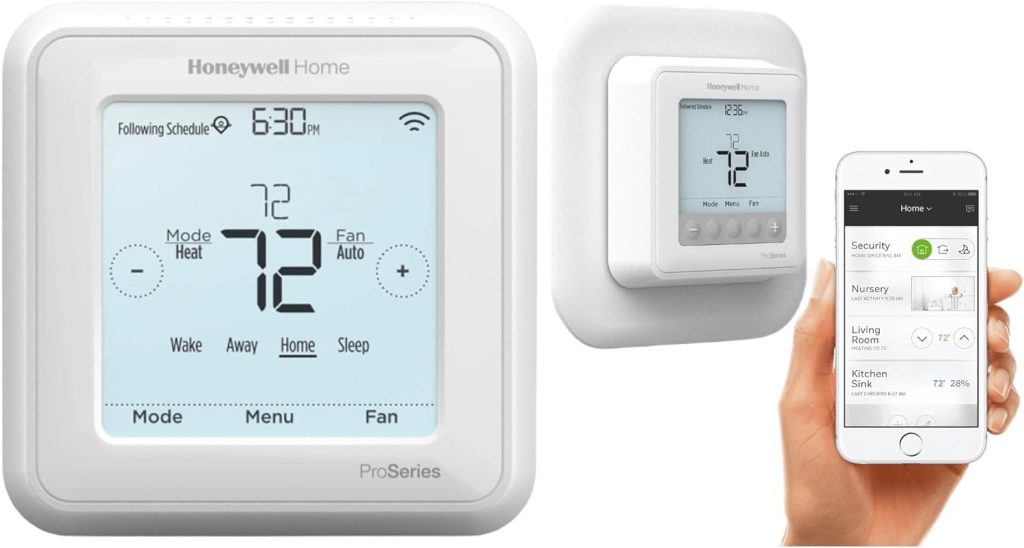
Price: ~$80 | C-wire: Required | Works with: Alexa, Google Home, Apple HomeKit
Stages: 2 heat/1 cool or 1 heat/1 cool | Room sensors: No | Subscription: None
The T6 Pro is the thermostat I’d recommend to most Honeywell buyers.
It handles two-stage HVAC systems, connects to Alexa and Google Home, and runs a 7-day programmable schedule with four time periods per day. The Resideo app handles remote access and scheduling from anywhere.
Unlike the Nest Learning Thermostat, the T6 Pro doesn’t build a schedule automatically, you set it manually.
For households with irregular schedules (shift workers, work-from-home, variable hours), this manual approach actually works better than Nest’s learning algorithm, which struggles to build reliable patterns from irregular input.
HomeKit support is a genuine differentiator at this price point.
The Honeywell T6 Pro joins Apple Home natively, meaning Siri temperature commands, Apple Home automations, and integration with other HomeKit devices all work without a hub or bridge.
The C-wire requirement is firm. The T6 Pro needs a C-wire for continuous power. It does not include an adapter kit (unlike Ecobee). Check your wiring before ordering. See our C-wire check guide.
The limitation: no room sensors and no learning capability. For a standard home with one zone and a predictable schedule, these aren’t needed. For a large or multi-room home where even heating is a challenge, step up to the T9.
Honeywell T9 Review — Best Honeywell Thermostat for Multi-Room Homes

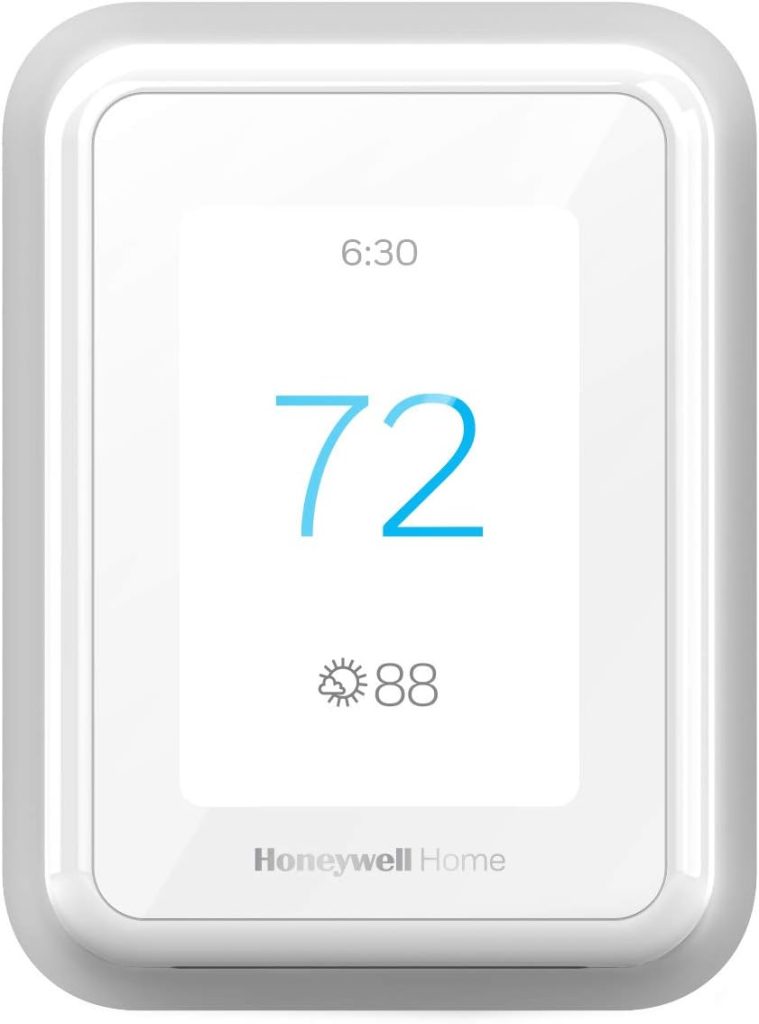
Price: ~$200 (includes 1 Smart Room Sensor) | C-wire: Required | Works with: Alexa, Google Home
Sensors: Up to 20 Smart Room Sensors | Subscription: None
The T9 ships with one Smart Room Sensor and supports up to 20 additional sensors across the home. Each sensor reports temperature, humidity, and occupancy.
The thermostat uses occupancy data to decide which rooms to prioritise. If the sensor in the bedroom detects someone sleeping, the T9 prioritises that room’s temperature during those hours.
For a three-bedroom home where the thermostat sits in the hallway, which is typically 3–4 degrees cooler than the bedrooms it’s supposed to serve, the T9’s room sensors solve the problem directly.
Place a sensor in each bedroom, set the occupancy schedule, and the T9 uses the average of active rooms rather than just the hallway sensor.
One Smart Room Sensor is included. Additional sensors are approximately $30 each.
For a four-bedroom home with a home office and living room, budget roughly $150 in additional sensors for full-home coverage, on top of the $200 thermostat cost.
The T9 vs T10 Pro decision: the T9 uses standard wireless technology for sensor communication. In most homes the effective range is 100 feet.
Thick concrete walls, steel framing, and multiple floors can reduce this. If your home is standard residential construction under 2,500 sq ft, the T9 sensors work reliably.
If your home is larger or older construction with thick masonry walls, consider the T10 Pro’s RedLINK sensors before committing.
No HomeKit. Unlike the T6 Pro, the T9 does not support Apple HomeKit natively. Alexa and Google Home work. For Apple households wanting room sensor capability, Ecobee with SmartSensors is the direct alternative.
Honeywell vs Nest vs Ecobee: Which Brand Should You Choose?
| Honeywell | Google Nest | Ecobee | |
|---|---|---|---|
| Learning schedule | No — manual | Yes (4th Gen) ✅ | No — manual |
| Room sensors | T9/T10 Pro ✅ | Nest Sensor only | SmartSensors ✅ |
| Apple HomeKit | T6 Pro only ⚠️ | Yes ✅ | Yes ✅ |
| No C-wire option | Limited ⚠️ | Power stealing ⚠️ | PEK included ✅ |
| Built-in Alexa speaker | No | No | Premium only ✅ |
| Subscription required | No ✅ | No (basic) ✅ | No ✅ |
| Entry price | ~$80 | ~$280 | ~$250 |
Buy Honeywell if: you want schedule-based reliability without learning algorithms, you’re in the Honeywell/Resideo ecosystem already, or the T9/T10 Pro’s room sensor system suits your home.
Buy Nest if: your household has a very regular routine and you want a thermostat that builds its own schedule. The 4th Gen’s learning algorithm is the best available.
Buy Ecobee if: you don’t have a C-wire (the Power Extender Kit comes in the box), you need HomeKit with room sensors, or you want a built-in Alexa speaker on the thermostat itself.
Common Honeywell Thermostat Problems: Quick Reference
If you’re troubleshooting an existing Honeywell thermostat, these dedicated guides cover each issue in full:
- Blank screen or display not turning on: See our Honeywell display not working guide
- Thermostat not turning on heat: See our Honeywell not heating guide
- General thermostat not working: See our Honeywell not working guide
- Flashing “Cool On”: See our Honeywell flashing cool on guide
- How to reset: See our Honeywell reset guide — all models
Frequently Asked Questions — Honeywell Thermostat Review
Which Honeywell thermostat is best for most homes?
The Honeywell T6 Pro (~$80) is the best Honeywell thermostat for most standard homes.
It supports two-stage HVAC systems, connects to Alexa, Google Home, and Apple HomeKit, and runs a 7-day programmable schedule with no subscription required.
It requires a C-wire. For homes with multiple rooms that heat unevenly, the T9 (~$200) adds room sensors that prioritise occupied spaces.
Does a Honeywell thermostat work with Alexa and Google Home?
Yes, all current Honeywell smart thermostats (T6 Pro, T9, T10 Pro) work with both Alexa and Google Home for voice control, temperature adjustments, and status checks.
Apple HomeKit support is available on the T6 Pro only; the T9 and T10 Pro do not support HomeKit natively.
Integration with both voice assistants requires the Resideo app and an active Wi-Fi connection.
Do Honeywell thermostats require a subscription?
No, all Honeywell Home thermostats work fully without a paid subscription.
The Resideo app, remote access, scheduling, geofencing, and smart home integration are all included at no ongoing cost.
This differs from Google Nest, which locks some features (familiar face detection, extended video history) behind Nest Aware subscriptions.
How is the Honeywell T9 different from the T10 Pro?
Both the T9 and T10 Pro use room sensors for multi-zone temperature control. The difference is the sensor technology.
The T9 uses standard wireless sensors with an effective range of approximately 100 feet in typical residential construction.
The T10 Pro uses RedLINK wireless sensors with approximately 200 feet of effective range.
For large homes above 2,500 sq ft or homes with thick masonry walls, metal framing, or multiple floors that reduce wireless range, the T10 Pro’s RedLINK sensors provide more reliable connectivity.
For standard homes, the T9’s range is sufficient.
What is the Honeywell T6 Pro, and is it worth buying in 2026?
The Honeywell T6 Pro is a programmable smart thermostat with Wi-Fi, scheduling, and voice assistant integration.
It supports two-stage HVAC systems and connects to Alexa, Google Home, and Apple HomeKit.
At ~$80 with no subscription required, it’s worth buying in 2026 for households that want reliable schedule-based temperature control without the learning algorithm of the Nest or the room sensor system of the Ecobee.
It requires a C-wire — check your wiring before ordering.
Final Verdict — Which Honeywell Thermostat Should You Buy?
✅ Standard home, want smart scheduling, don’t need room sensors
C-wire required. Works with Alexa, Google Home, and Apple HomeKit. Seven-day programmable schedule. No subscription. The right Honeywell thermostat for the majority of homes, reliable, well-supported, and significantly cheaper than the T9 or Nest 4th Gen.
✅ Multi-room home where some rooms always run too hot or too cold
Buy: Honeywell T9 (~$200) for homes under 2,500 sq ft. Honeywell T10 Pro (~$230) for larger homes or older construction with thick walls.
Both use room sensors to prioritise occupied spaces rather than averaging the whole house. The T9 is sufficient for most homes. The T10 Pro’s RedLINK sensors cover a greater range, worth the $30 premium, only if you have a large property or signal interference from thick masonry or metal framing.
✅ You want reliable scheduling with no Wi-Fi and no subscription — ever
Buy: Honeywell RTH7560E (~$50).
Seven-day programmable, no Wi-Fi, no app, no account, no subscription, no cloud dependency. Set your schedule on the device. It runs. No batteries for wired models. Will work exactly the same in ten years. For households that want temperature control without smart home complexity — this is the answer.
❌ Don’t buy Honeywell if you need any of these
- No C-wire and you don’t want to add one — Ecobee’s Power Extender Kit is the cleaner solution
- A learning thermostat that builds its own schedule — that’s Nest’s core feature, not Honeywell’s
- Apple HomeKit with room sensors — Honeywell’s T9 and T10 Pro don’t support HomeKit
- A built-in Alexa speaker on the thermostat — Ecobee Premium only


