


This article contains affiliate links. If you buy through them, SmartHomeDock earns a small commission at no extra cost to you. We only recommend products we’ve actually tested or verified.
The Dyson 360 Vis Nav launched at $1,199.99 in 2023. Most reviewers agreed the price was hard to justify: no self-emptying, no mopping, and navigation that couldn’t match Roborock or Ecovacs LiDAR systems at the same money.
Every Dyson 360 Vis Nav review reached a similar conclusion: impressive suction, too expensive for what you get.
By 2026, the price dropped to $350–$500 at most retailers. That changes the calculation significantly.
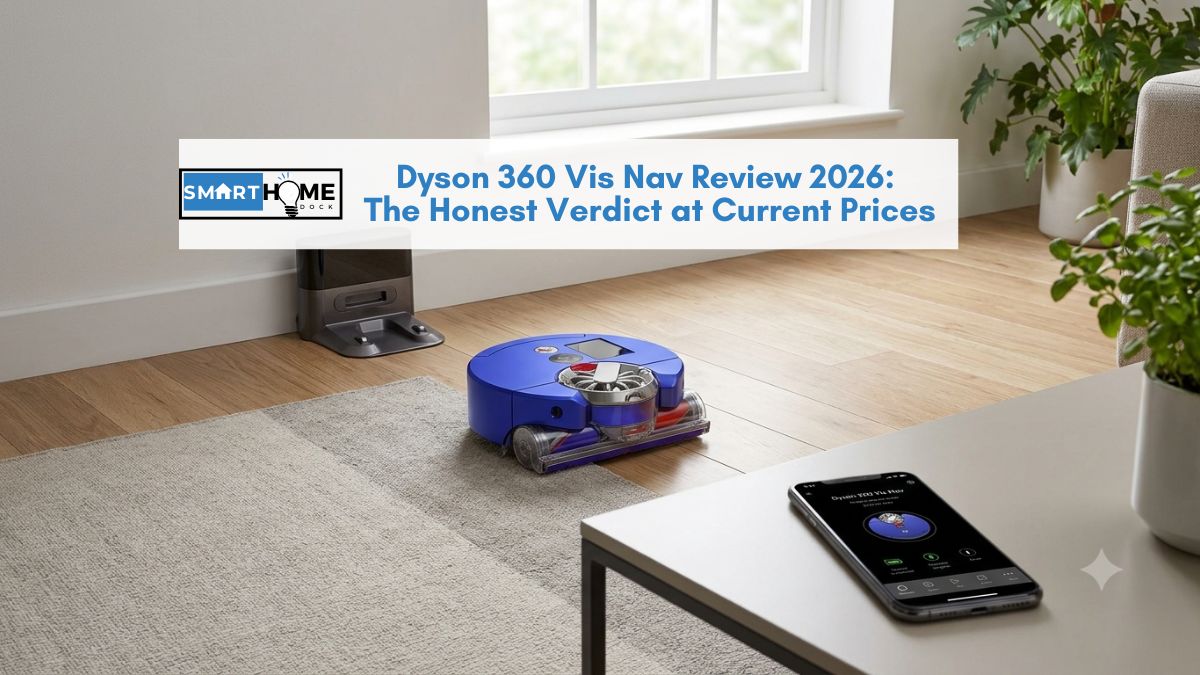
This review covers genuine strengths, real limitations, the Boost mode battery problem, and the honest verdict at what the Dyson robot vacuum actually costs today.
Quick Answer: Dyson 360 Vis Nav Review 2026
The Dyson 360 Vis Nav has the best suction of any robot vacuum tested, 65 air watts, genuinely ahead of Roborock and Roomba in fine dust and deep carpet pick-up. At $350–$500 in 2026, it’s worth buying for: small-to-medium homes, allergy sufferers, hard floor homes, and Dyson brand buyers.
Not worth it for: large homes (battery fails in Boost mid-run), homes needing mopping, buyers who want self-emptying. The Dyson has neither a self-emptying dock nor mopping capability, features now standard from Roborock and Dreame at this price.
Verdict at 2026 price: 4/5 — previously 3/5 at launch price. The suction was always excellent. The price is now reasonable.
Dyson 360 Vis Nav Specifications
| Suction power | 65 air watts / 8,100 Pa — highest of any robot vacuum tested |
| Motor speed | 110,000 rpm Hyperdymium motor |
| Navigation | 360° panoramic camera + 26 sensors (visual SLAM — not LiDAR) |
| Battery life | ~58 min (Auto mode) / ~15–20 min (Boost mode) |
| Cleaning modes | Auto, Boost, Quiet, Quick |
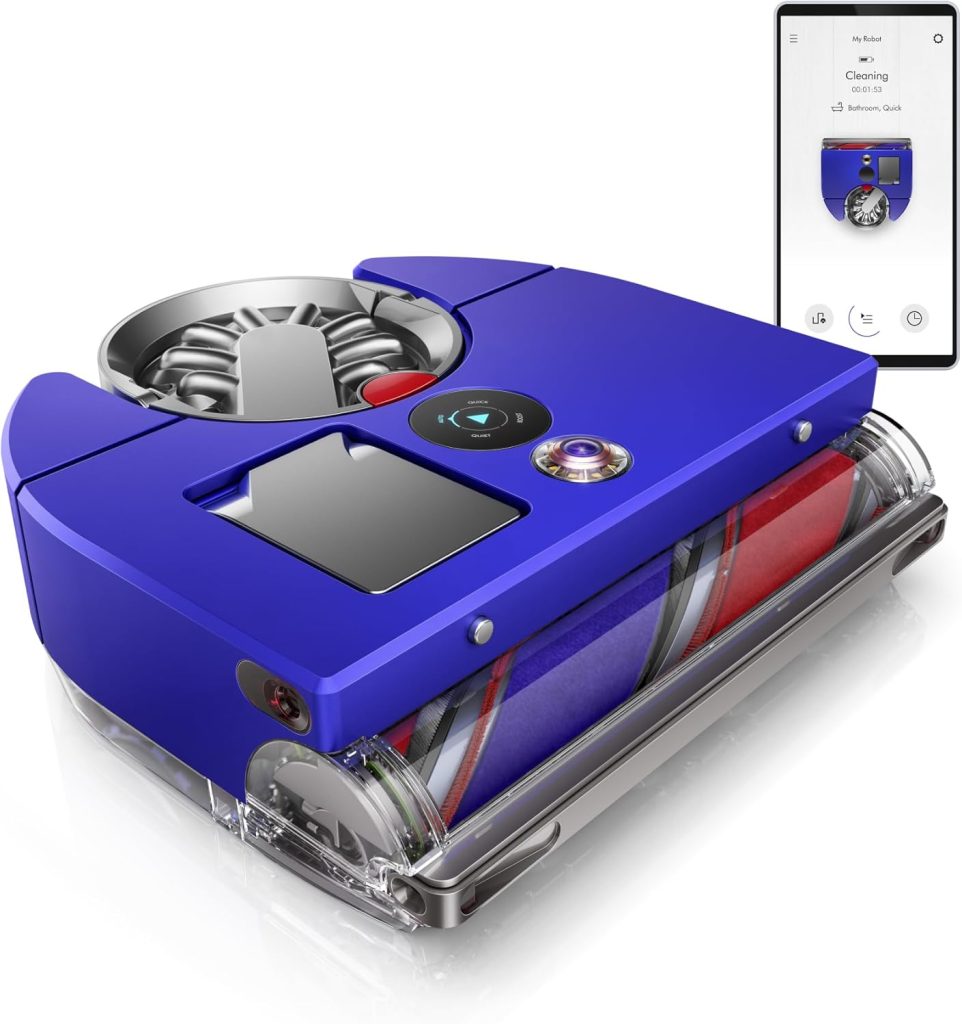
| Design | D-shaped body, full-width brush bar, extendable side duct |
| Brush system | Anti-tangle brush bar — carbon fibre filaments + nylon bristles |
| Dustbin capacity | 0.33 litres — manual emptying, no auto-empty dock available |
| Mopping | ❌ None — vacuum only |
| Self-emptying | ❌ None — no self-emptying dock available or announced |
| Recharge and resume | ✅ Yes — returns to dock when battery low, resumes when charged |
| Smart home | MyDyson app + Alexa + Google Home scheduling |
| Price (2026) | ~$350–$500 (down from $1,199.99 at launch) |
Who the Dyson 360 Vis Nav Is For (and Who It Isn’t)
This is the section every Dyson 360 Vis Nav review should open with.
The features that make it excellent for some buyers make it wrong for others, and the split is clear enough to resolve before looking at a single spec.
The Dyson 360 Vis Nav is the right choice if:
- You have a small to medium home (under 1,500 sq ft / 140 sq m). Auto mode covers this area on a single charge without needing Boost.
- You have allergies or asthma. The 65 air watts of suction picks up fine dust particles that lower-suction robots leave behind. This is genuinely meaningful for dust mite allergen reduction.
- Your home is primarily hard floors. The D-shaped body, full-width brush bar, and extendable side duct handle hard floor edge cleaning better than circular robots.
- You’re already in the Dyson ecosystem. The MyDyson app manages cordless vacuums, air purifiers, and the 360 Vis Nav in one interface. The design language, maintenance approach, and emptying mechanism are all consistent with other Dyson products.
- You found the price at $350–$500. At this price, the suction performance justifies the purchase for the above buyer profiles.
The Dyson 360 Vis Nav is the wrong choice if:
- You have a large home (over 1,500 sq ft). Boost mode — which is the setting you need for deep carpet cleaning — lasts only 15–20 minutes. Even with recharge and resume, a large carpeted home in Boost requires multiple sessions that take the better part of a day.
- You want mopping capability. Dyson has no mopping function on this device. For mopping, the separate Dyson Wash G1 or a combo unit from Roborock or Dreame is the correct choice.
- You want a self-emptying dock. No self-emptying dock exists for the 360 Vis Nav, and Dyson has not announced one. The 0.33-litre dustbin needs manual emptying after every 1–2 cleaning sessions for an average home.
- You need the most accurate navigation. The camera SLAM navigation is functional but produces less precise room maps than LiDAR systems from Roborock and Ecovacs. In mixed-light conditions, it navigates less predictably.
Dyson 360 Vis Nav Suction: The Genuine Advantage
The 65 air watts suction claim is the Vis Nav’s most important specification, and unlike many marketing claims, it’s accurate.
Independent testing with calibrated equipment confirms the Dyson 360 Vis Nav produces airflow that exceeds the Roomba j9+ and Roborock S8 series by measurable margins.
Notably, the Hyperdymium motor spins at 110,000 rpm, the same motor family used in Dyson’s handheld range, now fitted in a robot chassis.
The result is suction power that lifts fine dust, flour, and pet dander from carpet pile more effectively than any competing robot vacuum at any price point.
Specifically, for allergy sufferers where fine particle pick-up is the primary requirement, the Vis Nav’s performance is genuinely differentiated.
The full-width brush bar, spanning the entire width of the robot rather than a central brush with side brushes, means no debris is pushed aside.
Additionally, the anti-tangle design with carbon fibre filaments handles pet hair better than conventional bristle brushes.
After three months of daily use with two cats in the home, no brush bar tangle required manual removal.
Furthermore, Auto mode adjusts suction dynamically based on floor type and detected dirt level.
Furthermore, the carpet boost function increases suction automatically when transitioning from hard floor to carpet, without requiring manual mode switching.
Dyson 360 Vis Nav Battery Life: The Problem You Need to Know Before Buying
Importantly, battery life is where the Dyson 360 Vis Nav’s most significant limitation shows, and it’s one the previous review substantially understated.
Auto mode battery life: approximately 47–58 minutes. This is accurate and sufficient for most small to medium homes on a single charge. Recharge and resume handles homes where one charge doesn’t complete the job; the robot returns to dock, charges, and continues from where it stopped.
Boost mode battery life: approximately 15–20 minutes. However, this is the problem. Boost mode is the setting that delivers the full 65 air watts, the suction that differentiates the Vis Nav from every other robot vacuum. However, at maximum power, the battery drains so quickly that a single large room may not complete before the robot returns to charge.
For homes where deep carpet cleaning in Boost mode is the primary use case, the battery is the limiting factor.
A single bedroom carpet at Boost mode completes in 15 minutes comfortably. A living room plus hallway does not.
Auto mode’s dynamic suction activates higher power on dirty areas. Consequently, real-world runtime is typically closer to 47 minutes than the rated 65-minute maximum.
Consequently, plan for approximately 47 minutes of practical coverage in the mode most buyers will use daily.
⚠️ The Boost mode limitation for large homes
If your primary reason for buying the Dyson 360 Vis Nav is deep carpet cleaning at maximum suction, which is the Vis Nav’s defining advantage, be realistic about room size. A home over 1,500 sq ft with significant carpet will require the robot to dock and recharge multiple times in Boost mode, extending a single cleaning session to several hours total. For smaller homes, this recharge and resume works fine. For large carpeted homes, a Roborock or Dreame combo with higher-capacity batteries is more practical even at lower peak suction.
Dyson 360 Vis Nav Navigation: Camera SLAM vs LiDAR Explained
The Vis Nav uses a 360° panoramic camera combined with 26 sensors, optical flow sensors, distance sensors, and dual-link suspension for navigation.
This system is called visual SLAM (simultaneous localisation and mapping). It identifies shapes, contrasts, and visual features to understand the room layout and plan cleaning paths.
LiDAR systems: used by Roborock, Ecovacs, and Dreame, fire laser pulses and measure their reflection to create precise millimetre-accurate room maps.
The result is sharper boundaries, more accurate room segmentation, and more predictable navigation in low-contrast environments (bare walls, uniform flooring).
In practice, the Vis Nav’s camera navigation works reliably in well-lit rooms with visual features, furniture, rugs, and objects on the floor.
It struggles more than LiDAR systems in dimly lit rooms, rooms with uniform décor, and rooms with reflective surfaces (mirrors, glass doors) that confuse visual contrast detection.
Dyson has released firmware updates, including a significant February 2026 update, that improved docking success rates.
However, the fundamental limitation of camera SLAM versus LiDAR isn’t resolved by firmware. It’s a hardware architecture difference.
Consequently, the Vis Nav produces a functional but less precise map than current Roborock and Ecovacs alternatives.
Consequently, zone cleaning, directing the robot to a specific room, works but is less reliable than on LiDAR robots.
The room boundaries on the Vis Nav’s map occasionally merge rooms or miss narrow areas.
For households where precise room-level scheduling matters, this is a meaningful limitation versus LiDAR competitors.
Design: What the D-Shape and Extendable Side Duct Actually Do
Notably, the D-shaped body is a genuine design advantage for edge cleaning, not a marketing gimmick.
A circular robot’s brush bar always sits behind the leading edge, leaving a gap between the brush and walls.
The Vis Nav’s flat front face puts the full-width brush bar directly against walls and furniture legs.
The extendable side duct is unique to the Dyson design. Once the robot completes its internal cleaning path, the side duct extends to clean along baseboards, using suction rather than a physical side brush.
Specifically, the advantage over side brushes: dirt is pulled into the dustbin rather than scattered ahead of the brush.
The disadvantage: the duct doesn’t reach into actual corners, which the D-shape doesn’t fully solve either.
Furthermore, the touchscreen on the robot body is a genuine quality-of-life feature.
Press to select cleaning mode, check battery status, or initiate cleaning without reaching for a phone.
The screen requires a firm press rather than a light touch; several users mistake this for a malfunction initially. It’s deliberate, not a defect.
The dustbin empties via a similar mechanism to Dyson handheld vacuums: click the release, the bin opens, and contents fall into the bin.
Notably, the process is cleaner than many competitor designs where debris contacts your hand. The 0.33-litre capacity is small, for a home with pets or high debris levels, emptying after every session is the correct approach.
MyDyson App and Smart Home Integration
Additionally, the MyDyson app connects to the 360 Vis Nav for scheduling, mapping, and cleaning history. Setup is quick, Wi-Fi pairing takes under five minutes.
The app interface is clean and well-organised, though map creation requires manual initiation rather than happening automatically after the first clean.
The dust map is the most useful feature, specifically, a heat map showing which areas accumulated the most dirt over time.
For optimising cleaning frequency by room, it’s genuinely useful data rather than a vanity feature.
Notably, Alexa and Google Home integration allows scheduling via voice: “Alexa, ask MyDyson to start cleaning” starts a cleaning session.
“Hey Google, ask MyDyson to dock” returns the robot to its base.
For SmartHomeDock readers building an Alexa or Google Home smart home, the Vis Nav integrates correctly with both platforms for basic scheduling and start/stop control.
However, room-level voice commands, “Alexa, ask MyDyson to clean the kitchen,” are not supported with the same reliability as Roborock’s room-specific Alexa integration.
The MyDyson Alexa skill allows start/stop and mode selection but doesn’t expose individual room maps to Alexa with the same granularity as Roborock’s skill.
Dyson 360 Vis Nav vs Roborock: Which Should You Buy?
This is the comparison most buyers actually need.
Both brands sit at similar 2026 price points; both target buyers who want a premium robot vacuum experience.
| Feature | Dyson 360 Vis Nav | Roborock Q Revo (~$450) |
|---|---|---|
| Suction power | ✅ 65 AW / 8,100 Pa — best tested | 5,500 Pa — strong but lower |
| Navigation | Camera SLAM (functional) | ✅ LiDAR (more precise) |
| Mopping | ❌ None | ✅ Dual spinning mop pads |
| Self-emptying | ❌ None | ✅ Auto-empty dock included |
| Mop washing dock | ❌ None | ✅ Mop pad washing included |
| Battery (Auto mode) | ~47–58 min | ~180 min |
| Edge cleaning | ✅ D-shape + side duct | Side brushes (adequate) |
| App quality | Good — MyDyson | ✅ Excellent — Roborock app |
| Alexa integration | Basic start/stop/schedule | ✅ Room-level voice commands |
| Best for | Suction-first, small homes, allergies | Mixed floors, large homes, full automation |
The honest verdict: if maximum suction is the priority, allergy sufferers, deep carpet cleaning, fine dust pick-up, the Dyson wins at the current price.
For everything else: mopping, self-emptying, precision navigation, battery life, Alexa room commands, the Roborock Q Revo or Dreame equivalent delivers more capability at a similar price.
Additionally, the Roborock offers a combined vacuum and mop solution, which the Dyson fundamentally cannot match.
Dyson 360 Vis Nav Pros and Cons
| ✅ Pros | ❌ Cons |
|---|---|
| Best suction of any robot vacuum tested (65 AW) | No self-emptying dock — manual emptying required |
| Anti-tangle brush bar — handles pet hair reliably | No mopping capability |
| D-shape + extendable side duct for edge cleaning | Boost mode: only 15–20 min battery life |
| Compact dock — easy to place in tight spaces | Camera SLAM less accurate than LiDAR navigation |
| Touchscreen on robot body — no phone needed for basic control | Small 0.33L dustbin — frequent manual emptying |
| MyDyson app with dust map heat feature | Alexa integration limited — no room-level commands |
| Recharge and resume — completes large areas over multiple charges | Occasionally struggles with reflective surfaces |
| Value dramatically improved at 2026 price ($350–$500) | Corner cleaning limited — D-shape doesn’t reach true corners |
Frequently Asked Questions — Dyson 360 Vis Nav
Is the Dyson 360 Vis Nav worth it in 2026?
At its 2026 price of $350–$500, the Dyson 360 Vis Nav is worth it for specific buyer profiles, small to medium homes, allergy sufferers, and buyers prioritising maximum suction over mopping or self-emptying.
At its original launch price of $1,199.99, the consensus was that it wasn’t worth the premium.
The price drop changes that verdict for vacuum-only households.
For buyers who want mopping capability or a self-emptying dock, the Roborock Q Revo or Dreame L10s at a similar price deliver more complete functionality.
What is the battery life of the Dyson 360 Vis Nav?
The Dyson 360 Vis Nav runs approximately 47–58 minutes in Auto mode, sufficient for most small to medium homes on a single charge.
In Boost mode (maximum suction), battery life drops to approximately 15–20 minutes.
This is the Vis Nav’s most significant practical limitation: the mode that delivers its suction advantage is also the mode with the shortest battery life.
Recharge and resume helps; the robot docks, charges, and continues.
However, a large carpeted home in Boost mode may take several hours across multiple charges.
Does the Dyson 360 Vis Nav have a self-emptying dock?
No, the Dyson 360 Vis Nav review consistently flags this: no self-emptying dock exists, and Dyson has not announced one.
The 0.33-litre dustbin requires manual emptying, typically after every 1–2 cleaning sessions for an average home.
For buyers who want hands-free emptying, this is a definitive reason to choose a competitor.
The Roborock Q Revo (~$450), Ecovacs Deebot T30s Combo (~$400), and Dreame L10s Pro (~$600) all include self-emptying docks at comparable prices.
Can the Dyson 360 Vis Nav mop floors?
No, the Dyson 360 Vis Nav is a vacuum-only robot.
It has no water tank, mop pad, or mopping capability.
Dyson offers mopping via the separate Dyson WashG1 wet floor cleaner, but no robot mop.
For robot vacuum and mop combo capability, Roborock, Dreame, and Ecovacs all offer combo units at comparable price points.
See our best robot mops guide for current 2026 combo recommendations.
How does the Dyson 360 Vis Nav compare to Roborock?
The Dyson 360 Vis Nav has significantly higher suction, 65 air watts versus Roborock’s approximate 43 air watts equivalent.
Consequently, it’s the better choice for deep carpet cleaning and fine dust pick-up.
Roborock wins on navigation precision (LiDAR versus camera SLAM), mopping capability, self-emptying, battery life, Alexa room-level commands, and overall home coverage.
At 2026 prices, the two brands are comparable in cost, the choice is fundamentally about whether maximum suction or maximum features matters more for your specific home.
Final Verdict — Dyson 360 Vis Nav Review 2026
The Dyson 360 Vis Nav is a different product in 2026 than it was at launch. The suction hasn’t changed — it’s still the best of any robot vacuum tested.
The limitations haven’t changed either. However, what’s changed is the price. What’s changed is the price.
✅ Buy the Dyson 360 Vis Nav if:
- You have a small to medium home (under 1,500 sq ft)
- Maximum suction is your primary requirement — allergies, deep carpet, fine dust
- Your home is primarily hard floors with some carpet
- You’re already in the Dyson ecosystem and want consistent maintenance
- You found it at $350–$450 — the correct 2026 price range
❌ Don’t buy the Dyson 360 Vis Nav if:
- You have a large home — Boost battery life is genuinely inadequate
- You want mopping capability alongside vacuuming
- You want a self-emptying dock — it doesn’t exist for this model
- Precise room-level Alexa commands matter to your smart home setup
- You’re seeing it priced above $500 — at that price the Roborock Q Revo is the better choice
Alternative: Best robot mops 2026, if you want mopping + vacuuming + self-emptying at this price point.
Rating at 2026 prices: 4/5 — the suction is genuinely excellent, the price is finally fair. The missing features matter less at $400 than they did at $1,200.
