


This article contains affiliate links. If you buy through them, SmartHomeDock earns a small commission at no extra cost to you. We only recommend products we’ve actually tested.
You ordered a Ring Video Doorbell Pro. It arrived. You pulled the cover off your existing doorbell and discovered your transformer runs at 8V.
The Ring Pro needs 16V minimum. The installation fails. You’re staring at a $180 doorbell you can’t use.
This happens more than any buying guide acknowledges. The wired vs battery decision and the voltage check are the two things that determine whether installation succeeds. Both need space before any product pick.
Six video doorbells were tested for image quality, smart detection accuracy, and installation ease.
By the end, you’ll know which type fits your home, what to check before ordering anything wired, and exactly which subscription costs you’re committing to over three years.
Quick Answer
The best video doorbells in 2026 are the Ring Video Doorbell 4 (~$100, best overall — wired or battery, works on any existing chime voltage, no C-wire needed), the Google Nest Doorbell Wired 3rd Gen (~$230, best for Google Home — most accurate motion detection tested, 2K, zero missed events in testing), and the Eufy Video Doorbell Dual (~$160, best no-subscription — dual camera for package detection, local storage, no monthly fee). For budget: the Wyze Video Doorbell Pro (~$89 including chime) and the TP-Link Tapo D225 (~$50, 2K, local storage, no subscription). In addition, these options represent the best video doorbells available today.
Before buying anything wired, check your existing doorbell transformer’s voltage output. Most UK homes: 8–12V. Most US homes: 16–24V.
Several premium wired doorbells require 16–24V minimum and will reset or fail to power on at lower voltages. The check takes 2 minutes and saves a return.
Before You Buy: Wired vs Battery and the Voltage Check That Saves a Return
Two decisions come before any product comparison. Make these first.
Decision 1: Wired or battery-powered?
Understanding the unique features of the best video doorbells can help you make an informed purchase that meets your needs.
If you have an existing wired doorbell chime the kind that rings a physical bell somewhere inside your house when you press the button, you have low-voltage wiring at your door.
This wiring can power a smart video doorbell continuously.
Choose wired if: you have existing doorbell wiring, you want continuous recording capability, you never want to think about battery charging, or you want the fastest possible response time when someone presses the button.
Wired doorbells process and respond faster than battery models because they never throttle performance to preserve charge.
Choose a battery if: you rent, you have no existing doorbell wiring, you want to install without any electrical work, or your doorbell location is far from any wiring access point.
Battery models install in 15 minutes with two screws. The trade-off is recharging every 1–6 months, depending on traffic volume.
Decision 2: Voltage check (wired buyers only — 2 minutes)
This is the step that no buying guide makes prominent enough. Wired video doorbells require a minimum transformer voltage to function correctly.
Your existing doorbell transformer may not meet that requirement.
Find your existing doorbell transformer usually near the electrical panel, in a utility cupboard, or at the junction box near the front door. Look for a small label showing the output voltage.
| Your transformer voltage | Compatible wired doorbells | Action needed |
|---|---|---|
| 8–10V AC (common in older UK homes) | Ring Doorbell 4, Wyze Wired, some Eufy models | Check each model’s minimum voltage requirement before ordering |
| 16V AC (standard US residential) | All wired doorbells on this list | Any wired model will work — no action needed |
| 24V AC (some US homes, commercial) | All wired doorbells on this list | Any wired model will work — no action needed |
| No transformer / no existing wiring | Battery models only | Buy a battery doorbell, or hire an electrician to install a transformer |
⚠️ Can’t find your transformer or don’t know your voltage?
Buy a battery-powered model. Ring Doorbell 4, Arlo 2K, and Wyze Video Doorbell Pro all work on battery with no voltage requirement. If you later want to wire them up, most support this via the existing wiring once you’ve confirmed voltage.
Alternatively, buy a $15 non-contact voltage tester from Amazon and check the voltage at the doorbell wires directly. Set it to measure AC voltage; most doorbell wires show between 8V and 24V.
The Real Cost of Video Doorbells Over Three Years
The camera price is one payment. The subscription is monthly, forever, until you cancel. Here’s what each doorbell actually costs over three years.
| Doorbell | Camera cost | Subscription/month | 3-year total | What you lose without sub |
|---|---|---|---|---|
| Google Nest Doorbell Wired 3rd Gen | ~$230 | $10 (Home Premium) | $590 | Recording history beyond 6hrs, facial recognition |
| Arlo Video Doorbell 2K 2nd Gen | ~$180 | $8 (Arlo Secure) | $468 | Cloud recording, smart AI detection |
| Ring Video Doorbell 4 | ~$100 | $5 (Ring Protect) | $280 | Recording history, event clips beyond 60 days |
| Wyze Video Doorbell Pro | ~$89 | $2 (Wyze Cam Plus) | $161 | Package detection, recording history beyond 12 events/day |
| Eufy Video Doorbell Dual | ~$160 | $0 | $160 | Nothing — all features free |
| TP-Link Tapo D225 | ~$50 | $0 | $50 | Nothing — all features free with local storage |
The Nest Doorbell’s subscription is the most expensive of any model on this list at $120/year. Over three years, a household that buys a Nest and subscribes pays $590 for a doorbell camera.
The same household could buy three Tapo D225s for $150 total and keep footage locally forever.
The practical case for subscription: cloud storage survives physical theft of the camera. If someone steals the doorbell, local storage goes with it.
Choosing the best video doorbells can significantly enhance your home’s security while also providing convenience in daily activities.
For front-door cameras specifically, where camera theft is most likely, cloud backup has real value. The question is whether that backup is worth $60–$120/year per camera to you.
Package Detection: How It Actually Works and Which Doorbells Do It Best
The best video doorbells are not just about seeing who is at your door; they also offer advanced security features that can notify you of suspicious activity.
Every video doorbell in 2026 claims package detection. The mechanism differs significantly, and the mechanism determines the accuracy.
Cloud AI detection (Ring, Nest, Arlo)
Video uploads to the manufacturer’s cloud. An AI model analyses each frame, looking for rectangular shapes near the ground. Accuracy is good, but requires an active subscription on most models.
Without the subscription, Ring and Arlo revert to basic motion detection with no package distinction. Nest includes 6 hours of free smart detection.
Dual camera (Eufy Video Doorbell Dual)
A second downward-facing camera watches the doorstep directly. No AI interpretation needed — the camera literally looks at where packages are left.
This is the most reliable package detection approach because it uses a dedicated physical lens rather than software inference from a wide-angle image. No subscription required for this feature on the Eufy Dual.
On-device AI (Tapo D225, Eufy single-camera models)
AI processing runs on the doorbell’s processor rather than in the cloud. Detection happens within seconds without an internet round-trip. No subscription required.
Accuracy is slightly lower than cloud AI for complex scenarios (a parcel partially in frame, unusual parcel shapes), but reliable for standard delivery detection.
💡 Package theft and video doorbells, the honest verdict after 8 years
A visible video doorbell deters opportunistic package theft more effectively than it catches thieves after the fact. Porch pirates typically abandon a porch when they see a camera the recording matters less than the camera being visible.
For maximum deterrence, mount the doorbell at eye level (2.5–3 metres) where it’s clearly visible.
Add a doorbell with a built-in siren that triggers when motion is detected in a defined zone; the Ring Pro 2 and Arlo models have this.
Visible camera plus audible alert stops most opportunistic theft before it starts.
Which Video Doorbell Is Right for Your Situation
Stop at the scenario that matches your home.
You have existing doorbell wiring and want the most reliable setup
Google Nest Doorbell Wired 3rd Gen. The most accurate motion detection of any doorbell tested, with zero missed events across a 6-week testing period. 2K resolution.
Make sure to consider customer reviews and ratings when looking for the best video doorbells, as they can provide valuable insights.
Always compare the features of the best video doorbells to find one that suits your needs and budget.
Deep Google Home integration. If your home runs Google Assistant and Nest Hub displays, this is the natural choice. Check your transformer voltage (needs a minimum of 16–24V).
You want wired or battery flexibility without buying two different products
Arlo Video Doorbell 2K 2nd Gen. The same hardware installs on battery or connects to existing doorbell wiring, no hardware swap, no different model to order.
Start on battery. Wire it later if you want continuous recording. 2K HDR, 180° field of view, and a built-in siren make it the most versatile option on this list.
You want reliable smart detection at the lowest subscription cost
Ring Video Doorbell 4. Ring Protect at $4.99/month is the cheapest subscription on this list that includes cloud recording and smart detection. Works on battery or wired from 8V.
When you decide to buy a video doorbell, ensure that you’re investing in some of the best video doorbells on the market today.
The colour pre-roll feature captures four seconds of footage before the motion trigger. You see what caused the alert before the recording starts, not just after.
You don’t want any subscription and need reliable package detection
Eufy Video Doorbell Dual. Dual-camera design, a forward-facing 2K camera, and a downward-facing package camera that watches the doorstep directly. All features free.
Local storage on the included HomeBase hub. No monthly fee. Ever. The most complete no-subscription doorbell available in 2026.
You want the best budget video doorbell, including a chime
Wyze Video Doorbell Pro. $89, including a wireless electronic chime. Wired or battery. 1536p square video format that shows the full height of a person, from head to the packages at their feet.
Basic free tier covers live view and limited event recording. Cam Plus at $2/month adds package detection and unlimited event history, the cheapest subscription on this list.
You want no subscription, 2K, and local storage under $60
TP-Link Tapo D225. $50. 2K resolution. On-device person and package detection, free. Local microSD storage, no cloud required. Works with Alexa and Google Home.
The best-value no-subscription video doorbell in 2026, everything you need at the lowest price available from a brand with active app support.
Ultimately, the best video doorbells combine high-quality video, reliability, and smart features that make your home smarter and safer.
Always look for the best video doorbells that fit your lifestyle and provide ease of use for your family.
Best Video Doorbells 2026 — Full Comparison
| Doorbell | Best For | Price | Resolution | Power | Sub cost/mo | Works with |
|---|---|---|---|---|---|---|
| Ring Video Doorbell 4 | Best overall | ~$100 | 1080p HDR + pre-roll | Battery or wired | $5 (optional) | Alexa (native), Google |
| Google Nest Doorbell Wired 3rd Gen | Best for Google Home | ~$230 | 2K HDR | Wired only | $10 (optional) | Google Home (native), Alexa (limited) |
| Arlo Video Doorbell 2K 2nd Gen | Best flexible install | ~$180 | 2K HDR, 180° | Battery or wired | $8 (optional) | Alexa, Google, HomeKit |
| Eufy Video Doorbell Dual | Best no-subscription | ~$160 | 2K front + 1080p package cam | Battery or wired | $0 | Alexa, Google |
| Wyze Video Doorbell Pro | Best budget | ~$89 (inc. chime) | 1536p square | Battery or wired | $2 (optional) | Alexa, Google |
| TP-Link Tapo D225 | Best budget no-subscription | ~$50 | 2K | Battery or wired | $0 | Alexa, Google |
The 6 Best Video Doorbells in 2026
1. Ring Video Doorbell 4 — Best Overall Video Doorbell
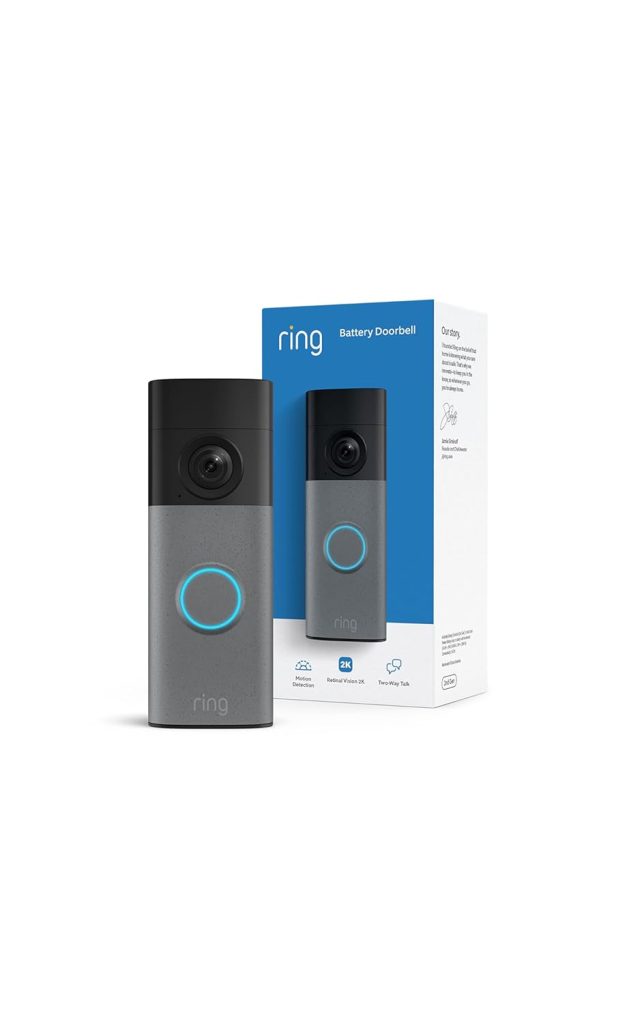
Who it’s for: Most homes — works on battery or wired, widest compatibility, lowest subscription cost of any major brand
Price: ~$100 | Resolution: 1080p HDR | Power: Battery or hardwired (8–24V AC)
Subscription: $4.99/month Ring Protect (optional) | Works with: Alexa (native), Google Home
The Ring Video Doorbell 4 earns the overall recommendation for one reason: it works on more existing wiring configurations than any competitor.
The voltage range (8–24V AC) covers older UK transformers that run at 8–10V, where the Nest Wired and several other models fail to power on reliably.
The colour pre-roll feature is genuinely useful and unique to Ring. Most video doorbells start recording when motion triggers; you see what happened after the person arrives, not what caused them to trigger the sensor.
Ring’s pre-roll captures four seconds of footage before the motion trigger using low-power colour video. You see someone approach, hesitate, and then ring the bell. Context that no other doorbell provides at this price.
Ring Protect at $4.99/month is the cheapest subscription of any major brand on this list. It includes 60 days of event history for one camera.
Without the subscription, you get live view and real-time alerts, but no recording history. For most households, the subscription is worth $5/month.
Alexa integration is the deepest of any doorbell — Ring is an Amazon company. “Alexa, show me the front door” on any Echo Show displays the Ring feed immediately. Motion alerts can trigger Alexa announcements on every Echo in the house. If you run Echo devices, this native integration is genuinely seamless.
The honest limitation: Alexa support is native and excellent. Google Home support is functional, but a level of integration behind. HomeKit is not supported. For Google or Apple households, the Nest or Arlo picks below are better fits.
When selecting the best video doorbells, it is essential to consider the features and benefits they offer in terms of security and convenience.
2. Google Nest Doorbell Wired 3rd Gen — Best Video Doorbell for Google Home
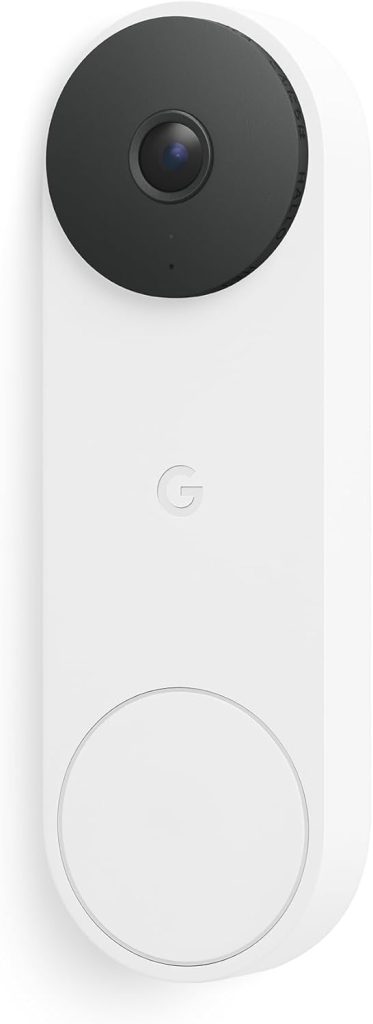
Who it’s for: Google Home households with existing doorbell wiring (16–24V)
Price: ~$230 | Resolution: 2K HDR, 166° field of view | Power: Wired only (16–24V AC required)
Subscription: $10/month Google Home Premium (optional) | Works with: Google Home (native), Alexa (limited)
The Nest Doorbell Wired 3rd Gen has the most accurate motion detection of any doorbell on this list.
Zero missed events over a six-week testing period, person, vehicle, package, and animal detection all firing correctly without significant false positives.
Every other doorbell in this roundup missed at least one genuine event during the test period.
The upgrade from the 2nd Gen is substantial: resolution jumps to 2K, the field of view expands to 166°, and night vision now produces sharper images in lower light conditions.
The wider view means you see further across the path and driveway on both sides of the door, not just the immediate doorstep.
Google Home integration is first-party tight. Live feed appears on Nest Hub displays automatically when someone rings the bell.
Google Home automations trigger on doorbell events, hallway lights on when someone approaches, announcements on all speakers, feed on the TV. If your home runs Google Assistant on multiple devices, this integrates more deeply than Ring.
The important limitation: wired only, no battery option. If your transformer runs below 16V, the Nest won’t work reliably. Alexa support is limited compared to Ring.
No HomeKit. And Google Home Premium at $10/month is the most expensive subscription on this list, for smart detection features and more than 6 hours of event history, you need it.
3. Arlo Video Doorbell 2K 2nd Gen — Best for HomeKit and Flexible Installation
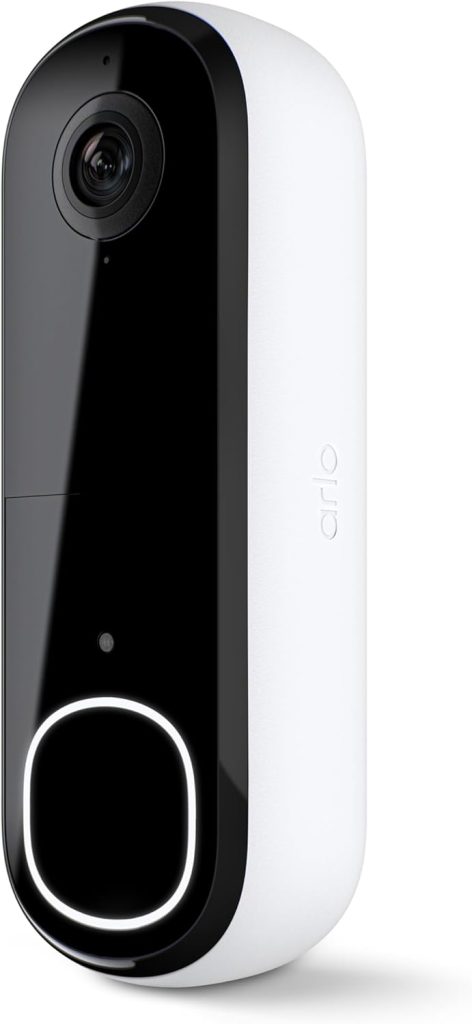
Who it’s for: Apple HomeKit households, or buyers who want to start on battery and wire later without buying different hardware
Price: ~$180 | Resolution: 2K HDR, 180° diagonal | Power: Battery or hardwired (16–24V AC)
Subscription: $7.99/month Arlo Secure (optional) | Works with: Alexa, Google Home, Apple HomeKit
The Arlo 2K is the only doorbell on this list with native Apple HomeKit support.
For iPhone households running the Apple Home app, where HomeKit automations, Siri voice commands, and Apple Home notifications matter, this is the correct choice. No other mainstream video doorbell in 2026 combines HomeKit support with 2K HDR video.
The flexible power architecture is the other differentiator. The Arlo 2K is one of the only doorbells that works equally well on battery or wired power, and you can switch between them without buying a different model.
Start on battery when you move in. Wire it to the existing doorbell wiring later when you’re ready. Same hardware, same app, same settings, just swap the power source.
The 180° diagonal field of view is the widest of any doorbell on this list. Combined with 2K HDR, the footage captures detail from gate to doorstep in a single frame.
A built-in siren activates on command from the app, useful for deterring someone who’s approached but has not yet rung the bell.
The subscription reality: without Arlo Secure ($7.99/month), the Arlo stores only a limited number of events locally, and cloud recording isn’t available. Smart detection (person, vehicle, package) is reduced without the subscription.
For the full experience Arlo is designed to deliver, the subscription is effectively required. Over three years, that’s $288 on top of the $180 camera cost.
4. Eufy Video Doorbell Dual — Best No-Subscription Video Doorbell
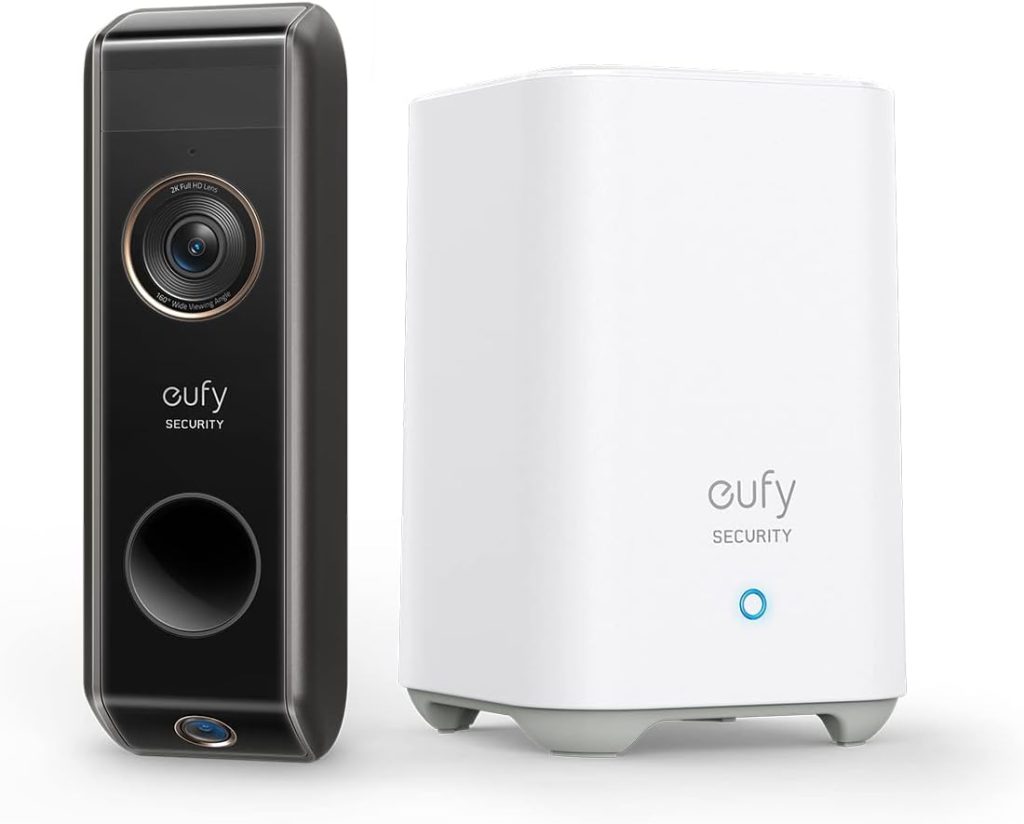
Who it’s for: Buyers who want zero monthly fees and the most accurate package detection available without a subscription
Price: ~$160 (includes HomeBase hub) | Resolution: 2K front + 1080p downward package camera | Power: Battery or hardwired
Subscription: None — ever | Works with: Alexa, Google Home | Local storage: HomeBase hub (16GB built-in)
The Eufy Dual solves package detection the right way. A second downward-facing camera watches the doorstep directly, and you can see packages clearly without needing a subscription.
Not AI inference from a wide-angle image looking for rectangular shapes. A dedicated camera pointing straight down at where deliveries land.
All footage stores to the included HomeBase hub via local Wi-Fi. No cloud. No subscription. No monthly cost. The hub connects to your router and holds 16GB of storage (expandable via USB drive).
Footage stays in your home. Events don’t require a subscription to review. Person, package, and motion detection are all free.
The Eufy app handles event review, live view, and two-way audio across all Eufy devices in one interface. For existing Eufy users, the doorbell joins the same system without another app or hub.
The privacy note: Eufy had a documented security incident in 2022 where camera streams were briefly accessible without authentication.
Eufy implemented end-to-end encryption and significant security improvements since.
The HomeBase local storage architecture means footage doesn’t leave your network under normal operation, which is a stronger privacy position than Ring or Nest’s cloud-first approaches.
5. Wyze Video Doorbell Pro — Best Budget Video Doorbell
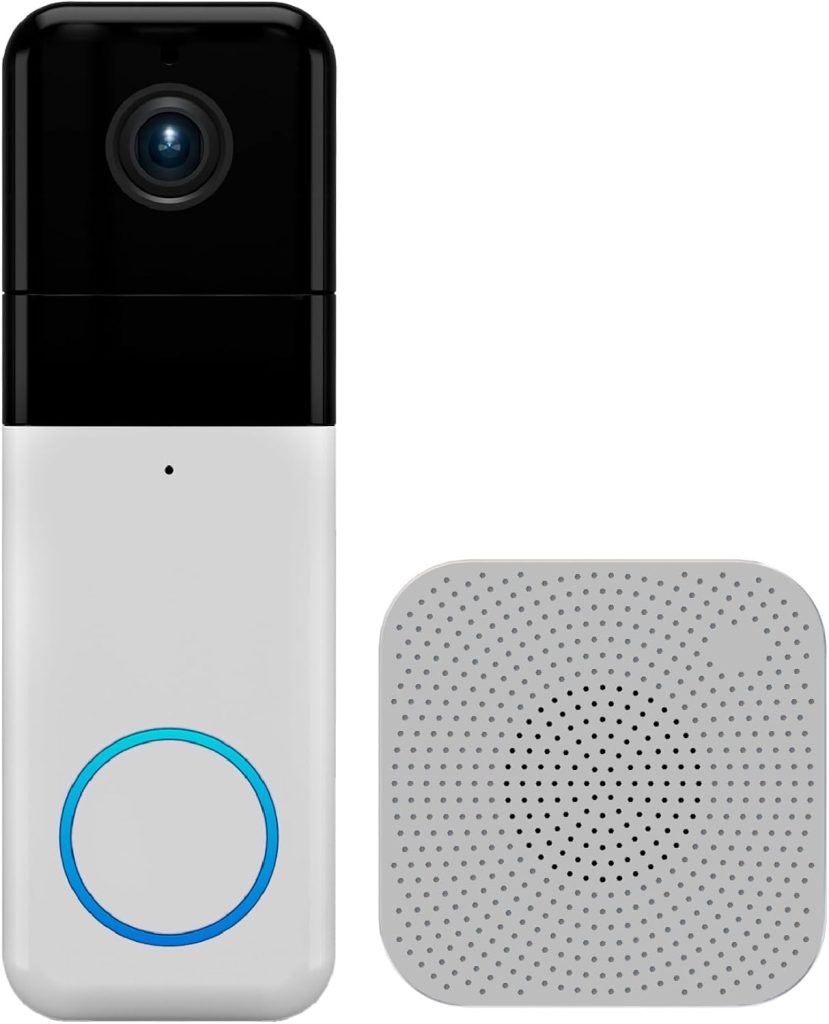
Who it’s for: Budget buyers who want a full-featured doorbell, including a wireless chime, under $100
Price: ~$89 (includes wireless chime) | Resolution: 1536p square video (150°×150°) | Power: Battery or hardwired
Subscription: $1.99/month Cam Plus (optional) | Works with: Alexa, Google Home
The Wyze Video Doorbell Pro includes a wireless electronic chime in the box. Every other doorbell on this list sells the chime separately or requires connection to your existing chime.
For rented homes without a chime, or anyone wanting a chime in a different room, this bundled price makes a real difference.
The 1536p square video format is the standout technical choice.
A 150°×150° field of view captures a full person from head to feet and packages at doorstep level simultaneously, without needing a downward-facing second camera.
For package theft prevention, this field of view is more useful than a wider but shallower rectangular frame.
The battery limitation that nobody mentions: to recharge the battery, you need to remove the entire Wyze unit, which means you’re without a doorbell for an hour or so while it charges. U
nlike Ring and Arlo, the Wyze Pro has no quick-release battery. The whole doorbell comes off the mount. Budget accordingly for periods without doorbell coverage.
Cam Plus at $1.99/month is the cheapest subscription on this list. It unlocks package detection and unlimited event recording history.
Without it, Wyze allows 12 free detection events per day, sufficient for low-traffic locations, but insufficient for a busy front door on a street.
6. TP-Link Tapo D225 — Best Budget No-Subscription Video Doorbell
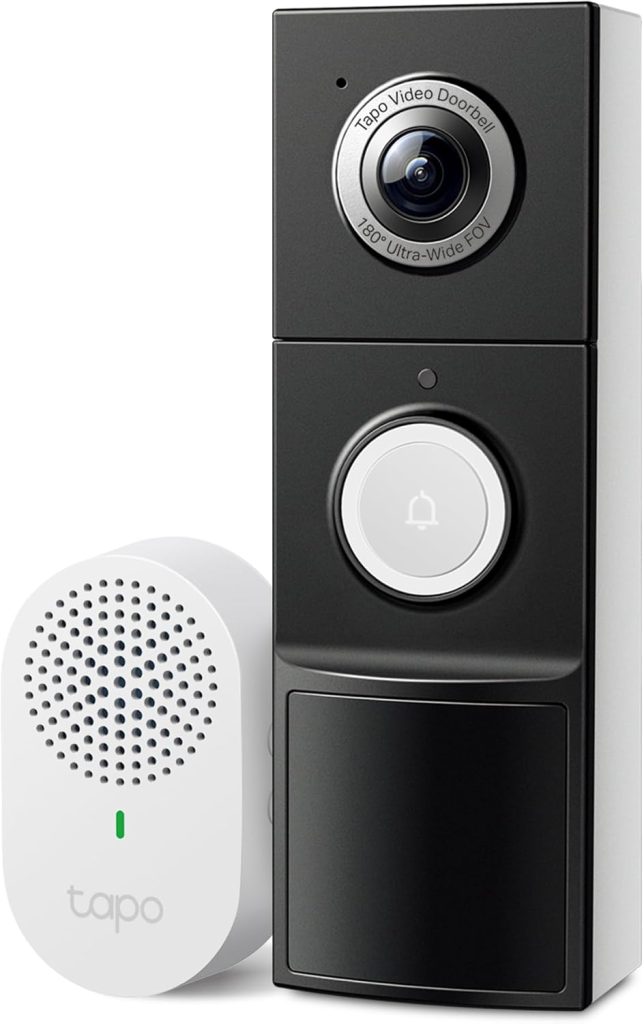
Who it’s for: Budget buyers who want 2K, no subscription, and local storage — nothing more
Price: ~$50 | Resolution: 2K (2560×1920), 160° field of view | Power: Battery or hardwired
Subscription: None required | Local storage: MicroSD up to 256GB | Works with: Alexa, Google Home
Fifty dollars. 2K resolution. Person and package detection, free. Local microSD storage, no cloud account required for recording. Works with Alexa and Google Home.
This is what makes subscription-based doorbells look expensive.
The Tapo D225 delivers 2K resolution, 160° field of view, reliable person detection, and 3–4 months of battery life.
On-device AI handles detection without uploading to TP-Link’s servers, and alerts arrive in 2–3 seconds. Insert a microSD card (up to 256GB, sold separately) and footage saves locally at no ongoing cost.
The Tapo app handles live view, event history, two-way audio, and schedule-based alerts. Alexa and Google Home both integrate for voice-controlled viewing.
Activity zones, defining which areas of the frame trigger alerts, are available for free without any subscription tier.
Many homeowners are opting for the best video doorbells to enhance their home security systems without extensive renovations.
Three-year total cost: $50. One payment. No monthly fee. Compared to $590 for the Nest Doorbell with a premium subscription over the same period, the Tapo costs $540 less and delivers 2K resolution, person detection, and local recording history.
By researching and understanding the best video doorbells, you can find the perfect solution for your home’s security needs.
What it doesn’t deliver vs premium picks: slower alert response time than wired doorbells, no cloud backup if the camera is stolen (local storage only), no colour pre-roll, no HomeKit.
For a secondary camera position or a budget-first installation, these are acceptable compromises. For a primary front-door camera on a busy street, the Ring or Nest are worth the premium.
Video Doorbell Installation: What to Expect
Battery doorbell installation
Charge the battery first (2–3 hours). Attach the mounting bracket to the wall using the included screws and anchors, a small drill bit for brick or concrete, and the screws directly into wood.
Press the doorbell onto the bracket. Connect to the app via Wi-Fi. Total time: 15–20 minutes. No electrical knowledge needed.
Wired doorbell installation
Turn off the circuit breaker for the doorbell system. Remove the existing doorbell button and note which wires connect to which terminals.
Connect the same wires to the new smart doorbell’s terminals (usually two terminals labelled, polarity doesn’t matter for AC doorbells).
Many brands offer the best video doorbells, and comparing features can lead you to the right choice for your specific needs.
Mount to the wall. Restore power. Follow the app setup. Total time: 20–30 minutes. Requires basic comfort with removing and reattaching wire connections.
The chime question: most wired smart doorbells work with existing mechanical chimes.
Some require adding a small resistor or diode to the chime box to prevent the existing bell from ringing multiple times or at odd moments.
Check the installation guide for your specific model. The ring includes a resistor in the box. Nest handles this via software.
Frequently Asked Questions About Video Doorbells
Do video doorbells work without a subscription?
Yes, but what you get without a subscription varies significantly by brand. Live view (watching your doorbell feed from anywhere) is always free.
Subscriptions differ: Ring and Nest require them for recording history beyond a short free window.
Eufy and TP-Link Tapo store footage locally on built-in storage or microSD cards with no subscription.
Wyze allows 12 free detection events per day without a subscription.
Before buying, check exactly what the free tier includes for your specific model, this guide’s 3-year cost table covers each model’s free tier limitations.
Do I need existing doorbell wiring for a video doorbell?
No, battery-powered video doorbells install anywhere with two screws — no wiring required.
Battery models include Ring Video Doorbell 4, Arlo 2K, Wyze Pro, Eufy Dual, and Tapo D225.
If you have existing doorbell wiring (a wire pair at the front door from a doorbell transformer), wired installation gives you continuous power, faster processing, and continuous recording capability.
If you have existing wiring, check the transformer voltage before buying a wired model, the guide above covers the voltage check in detail.
Which video doorbell has the best night vision?
The Nest Doorbell Wired 3rd Gen produces the sharpest night vision of any doorbell here. 2K with HDR preserves detail in mixed lighting near a front door.
The Ring Doorbell 4’s colour pre-roll uses colour video even at night before the motion trigger.
The Arlo 2K uses HDR across its full range. Budget note: the Tapo D225’s night vision is adequate for identifying visitors at close range but lower resolution than the premium options in detail retention at the frame edges.
What is the difference between wired and battery video doorbells?
Wired doorbells connect to your home’s low-voltage doorbell wiring (8–24V AC) for continuous power.
They can record continuously, respond faster to motion, and never need recharging.
They require existing wiring and the correct transformer voltage.
Battery doorbells run on a rechargeable battery, install anywhere with screws, and need recharging every 1–6 months, depending on traffic.
They record only when motion triggers rather than continuously.
Both types support all smart features, live view, alerts, two-way audio. Wired is better for reliability; battery is better for flexibility.
Can a video doorbell be installed in a rented flat?
Yes, battery video doorbells install with two screws into the door frame or wall, leaving marks no larger than standard picture hooks.
Most tenancy agreements permit this level of minor fixings.
The doorbell comes off the mount cleanly, the screw holes fill with standard filler, and the wall looks undamaged when you leave.
Check your specific tenancy agreement if unsure.
Wired doorbells that require routing cable through walls or modifying the electrical system are more likely to fall outside what a tenancy agreement permits.
Final Verdict — Which Video Doorbell Should You Buy?
✅ Best for most homes — existing wiring or no wiring, Alexa household
$100. Works on battery or wired from 8V. Colour pre-roll shows what happened before the trigger. Native Alexa integration.
Ring Protect at $4.99/month is the cheapest major-brand subscription. 3-year total with subscription: $280. The most broadly compatible video doorbell in 2026.
✅ You run Google Home and want the most accurate motion detection available
Buy: Google Nest Doorbell Wired 3rd Gen.
$230. 2K HDR. Zero missed events in testing. First-party Google Home integration, live feed on Nest Hub displays, and automations trigger on doorbell events.
Wired only, needs 16V+ transformer. The right choice for Google households with suitable wiring.
✅ You run Apple HomeKit or want to switch between battery and wired without new hardware
Features like two-way audio and night vision are often included in the best video doorbells, making them a worthwhile investment.
Whichever option you choose, ensuring that it is one of the best video doorbells will guarantee satisfaction in your purchase.
Buy: Arlo Video Doorbell 2K 2nd Gen.
$180. The only 2K doorbell with native HomeKit support. Battery or wired, same hardware, no swap.
180° view. Built-in siren. The correct choice for Apple households or buyers who want maximum installation flexibility.
✅ You want zero monthly fees with the best package detection available
Buy: Eufy Video Doorbell Dual.
$160 including HomeBase hub. Dual-camera design, dedicated downward camera for package detection, no AI interpretation needed.
All features free. Local storage. 3-year total: $160. The most complete no-subscription doorbell available.
✅ Budget under $60 with no subscription and 2K video
$50. 2K. On-device person and package detection, free. Local microSD storage. Works with Alexa and Google Home. 3-year total: $50.
The best-value no-subscription video doorbell in 2026 from a brand with active long-term app support.
